
Allowances are used instead of time codes if you want to include allowances in the system that aren’t based on hours. For example, this could be a snow call-out increment or an extra increment for a late change in the schedule. The outcome of events appears under Allowances.
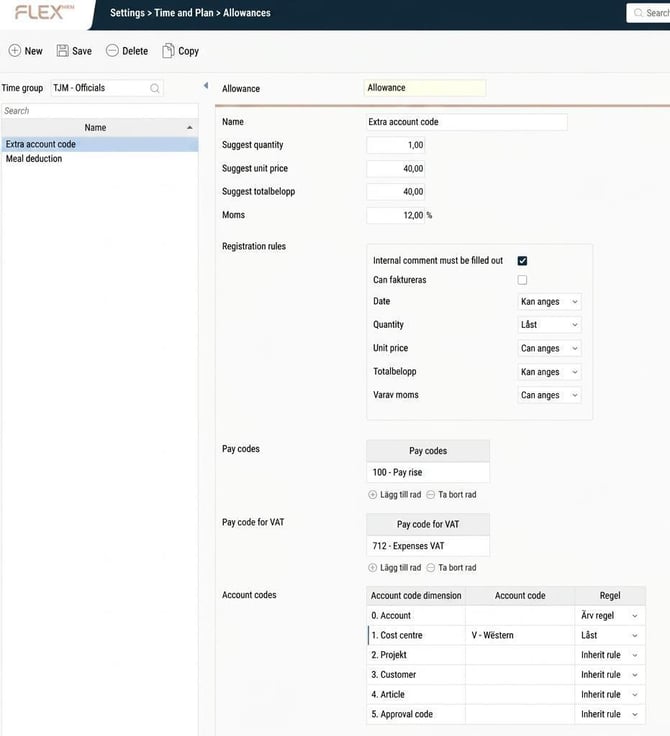
In the settings view for Allowances, you can create new allowance codes per time group and make the following settings:
- Name
- Suggest quantity/Unit price/total amount - Use this so that values are put out when the allowance code is registered.
- VAT - A percentage that the programme will use to calculate VAT on the current allowance.
- Registration rules - Here you can, among other things, specify if an internal comment must be filled out when the allowance code is used, or, for example, lock the quantity field if you want the value from Suggest quantity to be output and not be changed.
- Pay codes - If a pay code is specified here, the allowance will be transferred to payroll.
- Pay code for VAT - The pay code that should be used for VAT on the current allowance.
- Account codes - Used to, for example, specify that a certain cost centre should be output when the allowance code is registered. You can also set rules such as locking the field so the suggested cost centre cannot be changed.
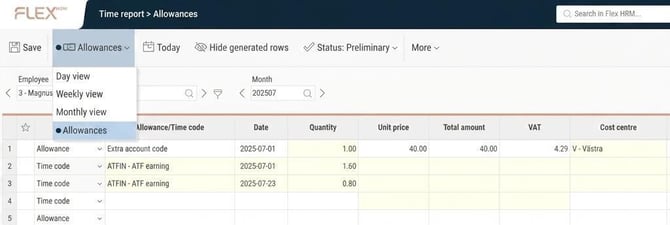
You can view and register allowance codes on the Allowances tab in the time report. Here you can also register time codes (if they're set to allow registration in the allowances view) and see which allowance codes/time codes have resulted from Events.
Related articles
How do you configure allowances to be able to be stamped in HRM Timeclock?
How do you use Events in HRM Time?
Please note: This article is AI-translated. This means that linguistic errors or misunderstandings may occur.