
Car trips
Car trips – General
In this view, you can configure the following settings:
- Car trips with a benefit car are registered in
- Unit for distance
- Calculation of fuel benefit
- Allow the same point in time to occur in multiple car trips
- Registration of travel itinerary
- Register travelling time on car trips
- The company uses mileage limit templates
- Other information
- Distance driven for work purposes with a benefit car
Here you specify settings for which view benefit car registration should take place in, and whether calculation of fuel benefit should be made via invoice calculation or via average price.
Unit for distance, km or miles, is also set here.
Travel itinerary settings with requirements regarding travel itinerary or only town/city of departure/destination are enabled here.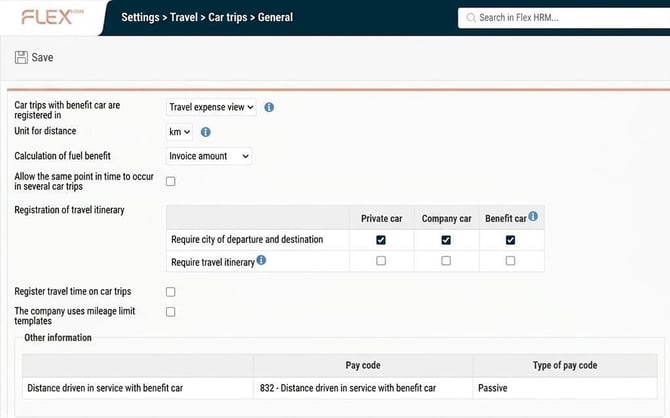
Car trips – Type of vehicles
Vehicles that should generate mileage claims are set up in the tab General (name, type, used with allowance/benefit, suggest increment), private car or company car, and whether they should be used with allowance and/or benefit.
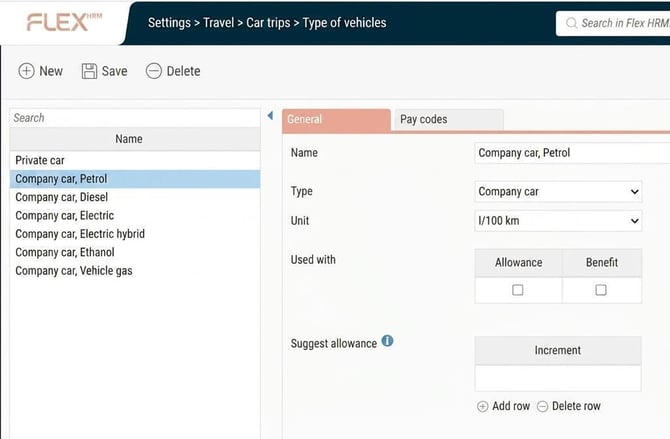
In the tab Pay codes you configure the following settings:
- Allowance for vehicles without fuel benefit
- Tax-free/taxable as well as benefit for vehicles with fuel benefit
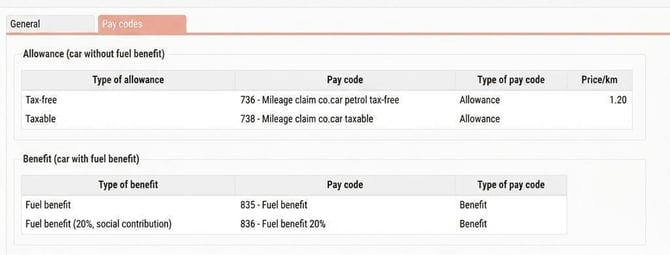
Pay codes, tax-free or taxable with allowance per unit, as well as pay codes for fuel benefit, are connected here.
Please note: This article is AI-translated. This means that linguistic errors or misunderstandings may occur.