
Authorisation of travel expense claim
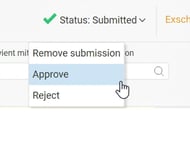
Travel expense claims can be authorised directly in the registration view on the travel expense claim by hovering the mouse over the Status button:
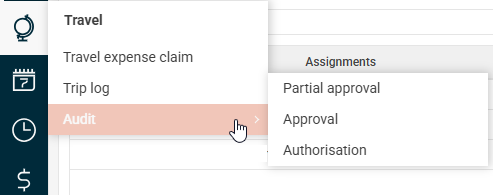
…or via an overview of items to be authorised, available under the Audit - Approval/Authorisation menu:
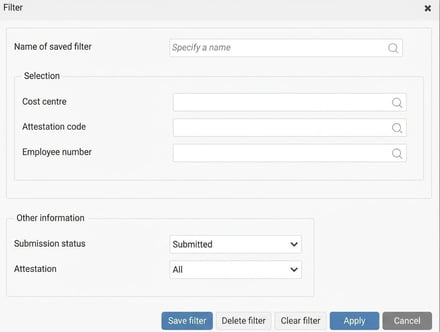
Here, all travel expense claims that match the criteria set in the filter function are listed:

It is recommended to use the shortcut buttons for each travel expense claim to (from the left):
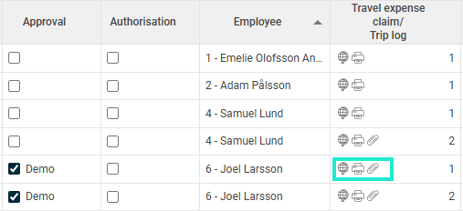
- go to the travel expense claim view and open the selected travel expense claim
- print the specification
- display the attachments and which transaction the attachment is linked to
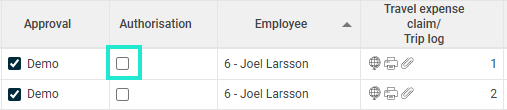
And finally, to authorise a travel expense claim, tick the Authorisation box:
Reject travel expense claim
With this button, you can reject the current travel expense claim directly on the travel expense claim by hovering the mouse over the Status button.
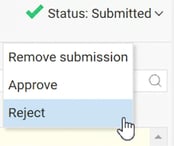
When rejecting the travel expense claim, you must specify a reason.
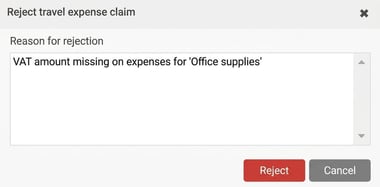
The notification appears on the travel expense claim, and the employee can be alerted via reminders.

Please note: This article is AI-translated. This means that linguistic errors or misunderstandings may occur.