
Time rules
+/- Days
Example
Time rules
Time rules (for unsocial working hours, overtime and standby) consist of day types and time code settings.

Often these are divided into day types such as Weekday and Weekend, where weekdays are ticked:
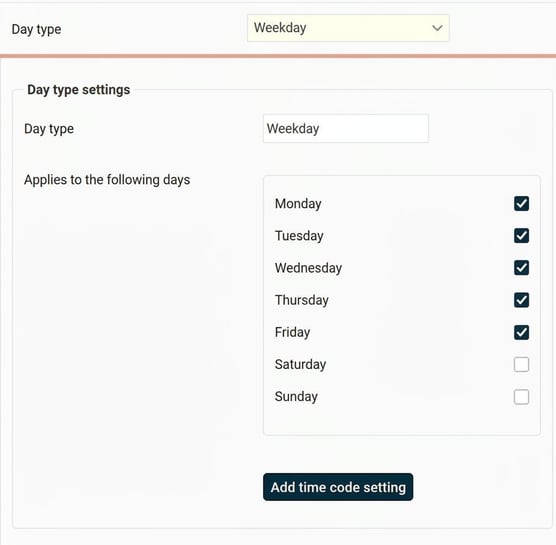
Days such as public holidays are entered as discrepant days to allow different time code settings for them. On these, weekdays are not ticked; instead, specific days are entered under Discrepant days. By entering a number in the +/- Days field, you can specify that x day(s) before or after the given day should be treated as a discrepant day.
If a discrepant day should only apply to certain years, it is possible to specify From and To year.
If you enter a date with year, the discrepancy applies for that year only. If you enter a date with only month and day, it continues until further notice.
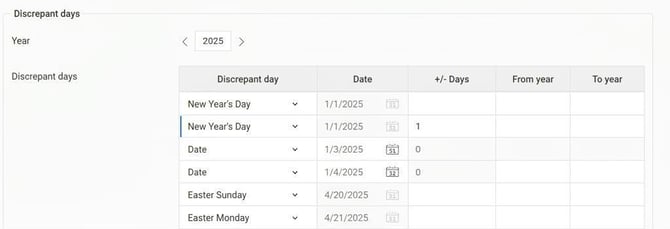
+/- Days
If it appears as below in a rule set, it means that the time code settings for this day type (in this case Public Holiday) apply on Boxing Day (top row) and the day after Boxing Day (1 on the bottom row means the day after).

Similarly, you can specify -1, which means the day before the specified day. In the example below, this results in 12 December (Lucia Day minus one day).

Example
Depending on how the time code settings look, the time code may apply to different time periods. Here are some examples:
Example 1
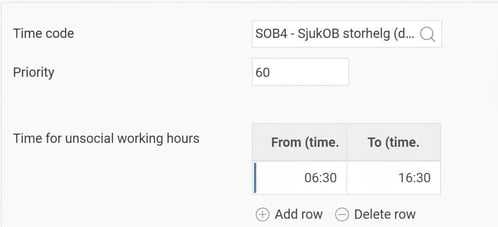
If the time code settings are as follows (06:30-16:30), those times apply on the day(s) the time code setting is valid.
If the discrepant days are Boxing Day and Boxing Day + 1, SOB4 applies 06:30-16:30 on 26 and 27 December.
Example 2
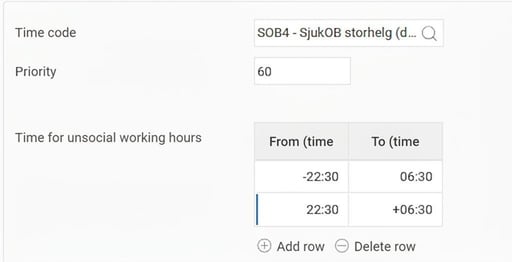
If the time code settings instead look as below (-22:30-06:30, 22:30-+06:30), the time code setting applies from 22:30 the evening before to 06:30 on the current day, as well as 22:30 on the current day to 06:30 the next day.
If the discrepant days are Boxing Day and Boxing Day + 1, SOB4 applies
25 Dec 22:30 - 26 Dec 06:30
26 Dec 22:30 - 27 Dec 06:30
27 Dec 22:30 - 28 Dec 06:30
Please note: This article is AI-translated. This means that linguistic errors or misunderstandings may occur.