
How do you export travel expense claims and attachments?
Go to Actions processed > Service routines > Export data.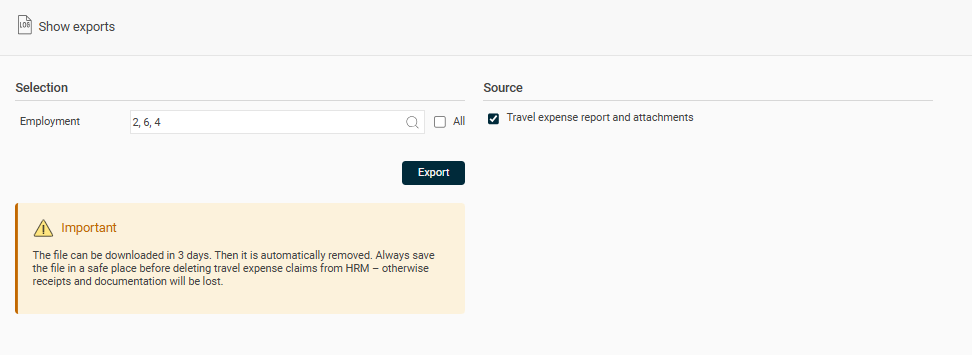
Follow these steps to start the export:
- Select employees or select All. You must select employees to start the export.
- Select Travel expense report and attachments.
- Click on Export.
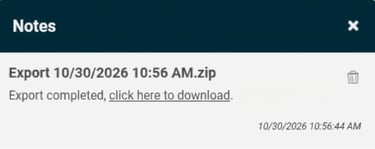
Once the export is complete, you will receive a notification with a link to download the file.
What does the exported file look like?
The export creates a compressed folder (zip file). The folder structure depends on how many employees you have selected:
- Several employees: The file contains one folder per employee. Each of these folders contains a subfolder for each travel expense claim. There you will find the travel expense claim specification as a PDF file, as well as separate files for the attachments.
- One employee: The folders for the travel expense claims are located directly in the compressed folder, without an intermediate folder for the employee.
All travel expense claims for the employments included are exported, regardless of status and without filtering by period.
How do you check the status and download the export?
Click on View exports to see earlier exports and their status.
Possible statuses:
- Being created
- Complete
- Downloaded
- Failed
- Removed
Please note: The file is saved in the log for 72 hours (three days) after it was started.
After that, it is deleted automatically and cannot be restored. Always save the file in a secure location before deleting travel expense claims from Flex HRM, otherwise receipts and specifications will be lost.
What happens if a problem occurs during the export?
The export runs as a background job.
- If the entire job fails for any reason, you will receive a notification stating Export failed and no file will be created.
- If a PDF file cannot be created for an individual travel expense claim, the system skips that claim. The remaining travel expense claims are exported as usual and the export job is still completed.
Please note: This article is AI-translated. This means that linguistic errors or misunderstandings may occur.