
Before each new tax year, as a payroll manager you need to retrieve information about which tax table and any adjustment decision that applies to your employees. You do this by submitting a FOS-request (Questions about tax deductions) to the Swedish Tax Agency. Requests can also be made during the year for new employees.
In this function in Flex HRM Payroll, you create a FOS-request and apply the specification. You can find the function here: Actions processed > Annual routines – FOS-requests
Create a new FOS-request
1. To create a new request, click the New button.
2. In the dialogue box that appears, select which income statements year you want to retrieve tax details for.
Important! When retrieving details for a new tax year, it is essential that you have completed all payroll payments for the previous year.
3. Make a selection for which employees to include in the request. For example, you can choose to include terminated employees if you have recurring seasonal staff.
4. Click Retrieve.
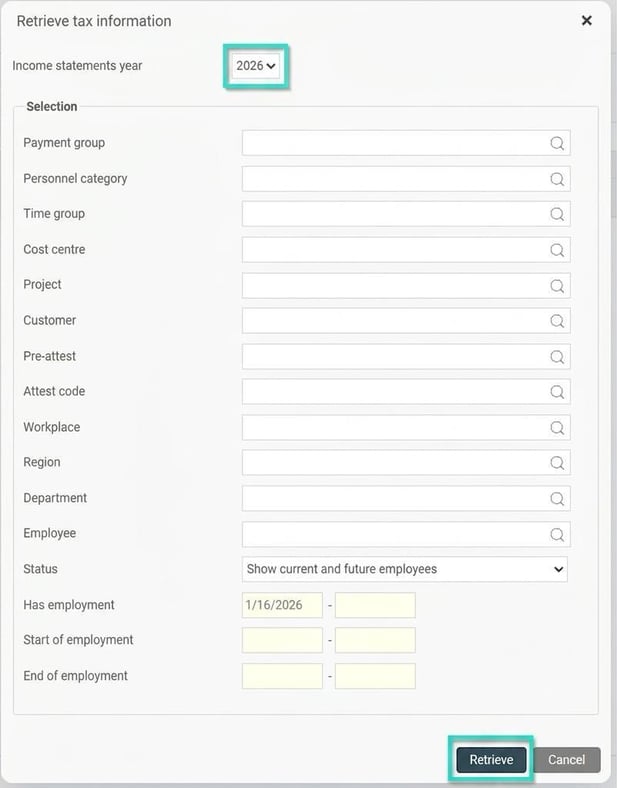
A request is now sent via the Swedish Tax Agency's API. Within a few seconds up to a few minutes, depending on the number of employees, you will receive a response which is displayed directly in the view. If something goes wrong, for example if a national ID number is not in the register, an error log will be shown.
Check and audit the details
Once the details have been retrieved, they appear in a preliminary list and do not update the employee register immediately. All FOS-requests you have made are saved and you can view earlier requests using the Income statements year field.
To make it easier for you to see which details have changed, these are highlighted with a yellow background colour.
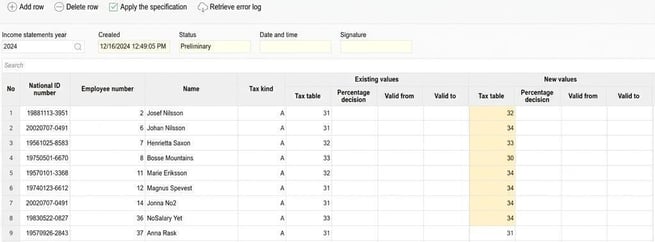
Note that employees with side income are also included and their details updated. As long as the employee is marked for side income, the tax calculation will not be affected. If they later take on main employment with you, the correct tax table will already be in place.
Apply the specification
Once you have checked everything is correct, it is time to apply the specification. This means that the new tax details are transferred to the employee register and will form the basis for future tax calculations.
Remember! Apply the specification after all payroll runs for the old year are complete, and before you process any payroll runs for the new year.
You apply the specification by clicking the Apply the specification
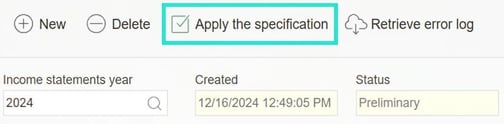
Please note that once applied, this action cannot be undone.
Please note: This article is AI-translated. This means that linguistic errors or misunderstandings may occur.