
Please note
The possibilities to manage absence are controlled by authorisations.
Absence in the Staffing plan
In the view Overview displays absence if you have chosen to show staffed employees (set in More > Settings)
|
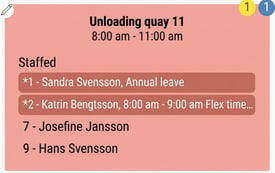
Absence is displayed in red. If the absence applies to only part of a shift, the relevant times are shown. |
|
|
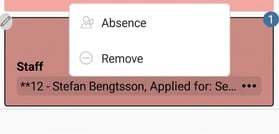
Requested absence that has not yet been processed is marked with two asterisks (**). You can click the three dots to open the Absence Manager and process the request.** You can also click the three dots for a scheduled employee to open the Absence Manager and register a new absence. |
|
Absence in Work shift
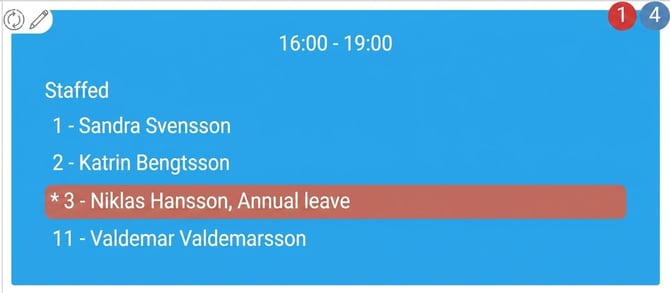
In the view for work shifts, absence is displayed in red, provided that you have chosen to show scheduled employees via More > Settings. |
|
|
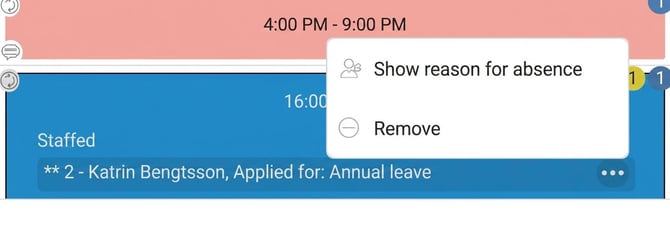
You can view and manage requested absence in this view. Requested absence is marked with two asterisks (** ). Click the three dots to open the Absence Manager. |
|
Absence in Schedule
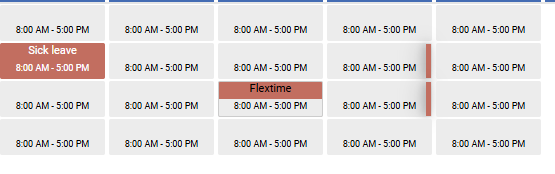
In the view Schedule the system marks absence in red.
|
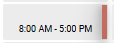
Full-day absence is indicated by a red highlight covering the entire day. Part-day absence is indicated by a red highlight covering part of the day. Requested absence awaiting approval is marked with a red bar along the right-hand edge of the day. |
|
| You can click on a day to view detailed absence information. | 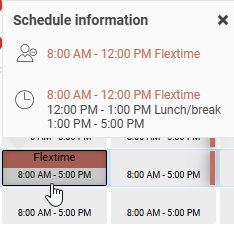
|
|
Process a requested absence: Click the red bar to open the Absence Manager. |
 |
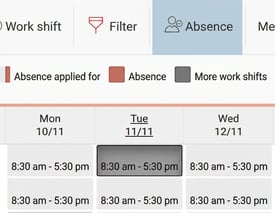
| Open the Absence Manager or register a new absence: Select a day and click the Absence icon. |
|
Please note: This article is AI-translated. This means that linguistic errors or misunderstandings may occur.