
You can copy projects in the extended project register by using the Copy button. This is useful if you have several similar projects or want to use a project as a template for your project structure.
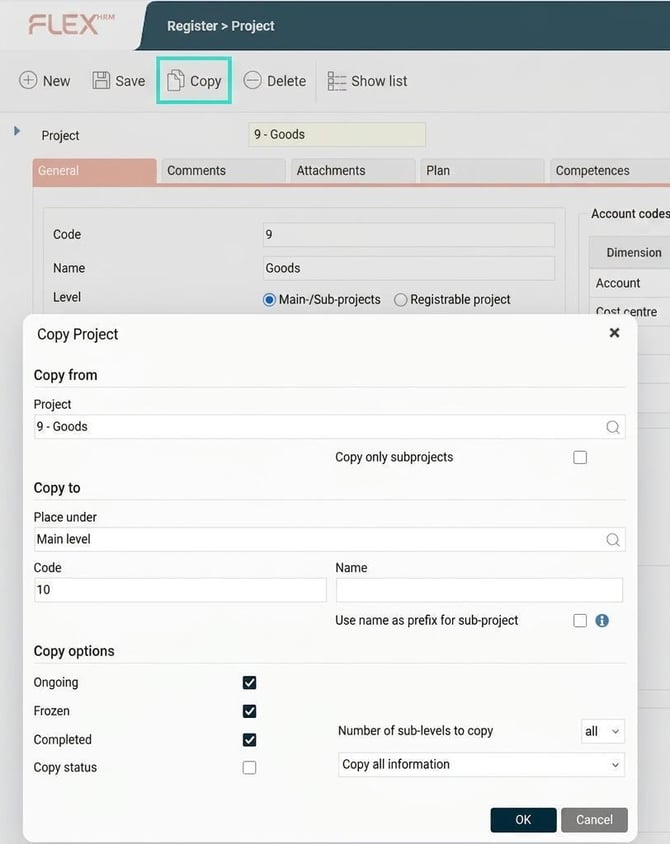
When you click the Copy button, a window opens where you can select options for the copy.
Note
Here, we use the term Project. You may have chosen to name the extended project register differently in your system.
Select project to copy from
In the Copy from field, the project marked in the project tree is proposed. If no project is marked, the field is empty and you need to search for the project you wish to copy.
Here you can also choose whether you want to copy:
-
The entire project
-
Only subprojects (Useful, for example, if you want to copy several subprojects into another main project.)
Select where the copy should be placed
In the next step, Copy to, you select where you want the copy to end up.
-
By default, the system proposes to place the copy at the same level as the source project.
-
You can change the placement by searching for another main or subproject.
-
If you are only copying subprojects you must select a new main or subproject to copy to.
If you copy to the same main or subproject, you need to specify a new code for the copied project, as all project codes must be unique.
You can also:
-
Specify a name for the copied project.
-
Choose whether you want the name to be used as a prefix on the underlying project level.
Select options for the copy
Here you choose what information should be included in the copy.
You can choose to:
-
Copy ongoing, frozen and/or completed projects.
-
Copy the project's status. If you choose not to copy status, all copied projects will have the status Ongoing.
-
Limit the number of sublevels to copy (by default, all are copied).
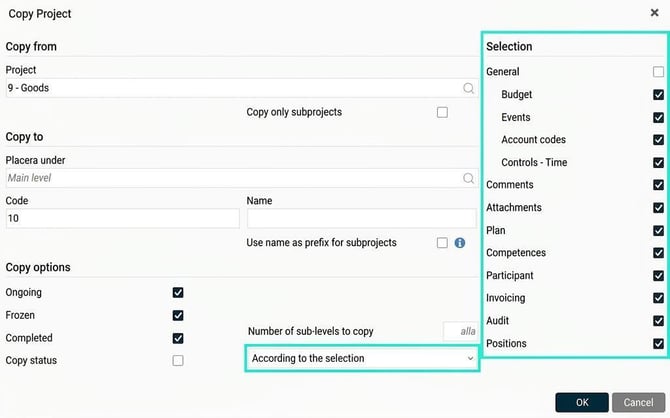
If you do not want to copy all information you can change the default setting and choose to:
-
Only copy the project structure (that is, only code and name of the projects).
-
Make a selection on specific tabs in the project register that you want to copy. In this case, select According to the selection and tick what should be copied.
Please note: This article is AI-translated. This means that linguistic errors or misunderstandings may occur.