
General - Audit levels
Under Administration > General > Audit levels you specify which audit levels can be used in the system. Creating an audit level does not automatically mean that this audit level will be used for each company.
The following submenus are available (depending on licence):
- Travel expense claims
- Time reports
- Absence applications
- Salary review
- New employments
The names will be used in various menus, windows and printouts and must be specified in noun, adjective, and verb form, as all forms are used in different parts of the programme.
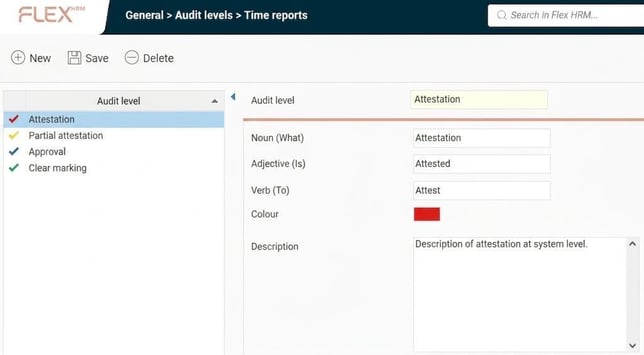
In the list on the left, you can see the audit levels that have been set up in the system. In our example version for auditing of time reports, four audit levels have been added, but we will only use three as examples: Final marking, Approval and Attestation. The number of levels you set up and the names you assign to them are entirely optional.
On the right, information about the current audit level is shown.
Noun (What)
Here you specify the name for the actual audit level, for example Attestation.
Adjective (Is)
Here you specify the adjective form for the current audit level, for example Attested.
Verb (To)
Here you specify the verb form for the current audit level, for example Attest.
Colour
Here you specify the colour to be used for the current audit level by clicking on the colour box .
Description
If required, you can enter a description of the function/usage of the current audit level here.
Settings - Audit levels
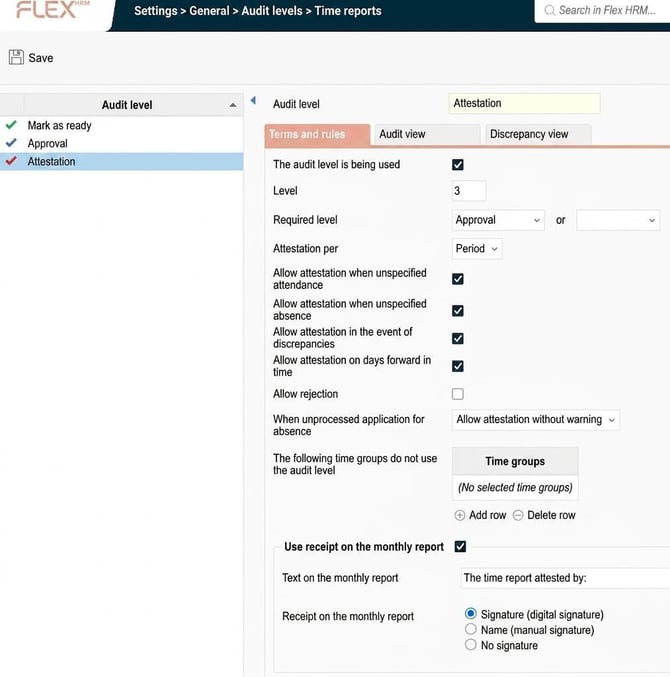
Under Administration > Settings > General > Audit levels settings are made regarding the various levels for audit that should be used in the system according to each company's requirements.
For each audit level, you can specify whether the selected audit level should be used or not in the company, and also specify how it should be used for each level - for example, whether a certain level should have requirements from an earlier level or not. You can also specify different settings, depending on your licence, for how the audit levels should work in the current company.
Please note: This article is AI-translated. This means that linguistic errors or misunderstandings may occur.