
Concern management
Concern management in Flex HRM is an add-on module that allows you to manage several companies (parent companies and subsidiaries) as a concern in the system.
Licence settings
To use concern management, you need the add-on module.
You specify which companies should use the concern licence under Administration > General > Company. On the tab Licence you can uncheck the licence for concern on the companies where you do not want to use the function. The companies that must have the checkbox for concern checked are the concern's parent company as well as all subsidiaries.
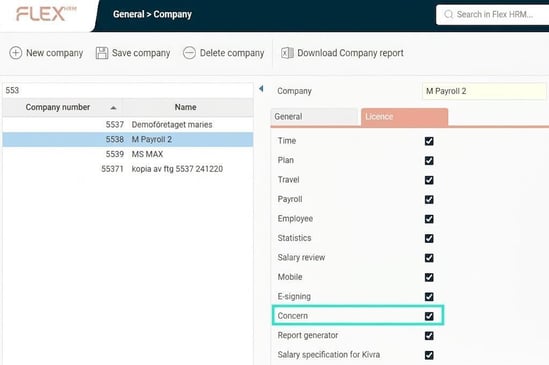
Step 1: Specify parent company
The first step is to select which company should be the concern's parent company. You do this under Administration > General > Company by ticking the setting Company is parent company for a concern.
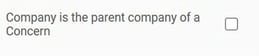
If you want to set up several concerns in the same database, that's fine. You then tick this setting on all companies that are parent companies for each concern.
Step 2: Connect subsidiaries
The next step is to define which subsidiaries are included in the concern. You do this in the view Administration > General > Concern management.
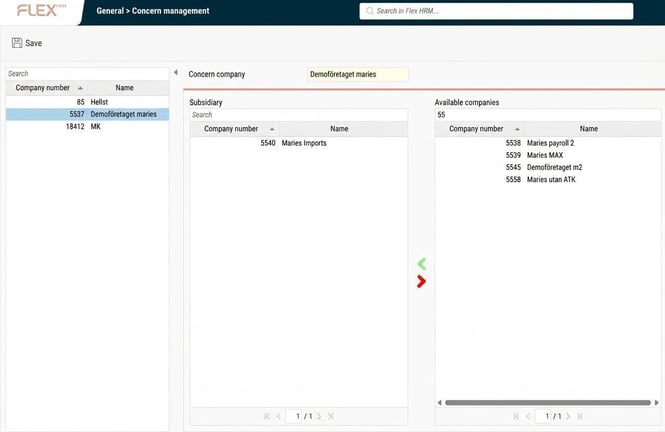
In the list on the Left, you see the companies marked as concern parent companies. When you select a company in the list, two lists appear on the Right:
-
Subsidiaries included in the concern.
-
Other companies not included in the concern.
You add or delete subsidiaries in the concern by moving companies between the lists using the green and red arrows.
Please note: This article is AI-translated. This means that linguistic errors or misunderstandings may occur.