
To activate the transfer of accounting information to Visma.Net Finance, please contact us via the Service Portal
How the integration works
- The connection from HRM Payroll to Visma.Net will be established from the company where the application link was created to the main company in Visma.Net.
- The transfer of accounting transactions will automatically be linked to the General Ledger that has Balance Type Actual in the connected company in Visma.Net.
- For the transfer to be carried out correctly, the main ledger in Visma.Net must also have SEK as the currency, as we always send SEK from HRM Payroll.
Using the function
In the view for Accounting (Payroll > Accounting) there is a button for direct transfer of a journal voucher:
The existing button for creating an accounting file is still available and can be used parallelly with the new direct transfer function.
When you choose to carry out a direct transfer, you will have the option to make the same selection as when creating an accounting file.
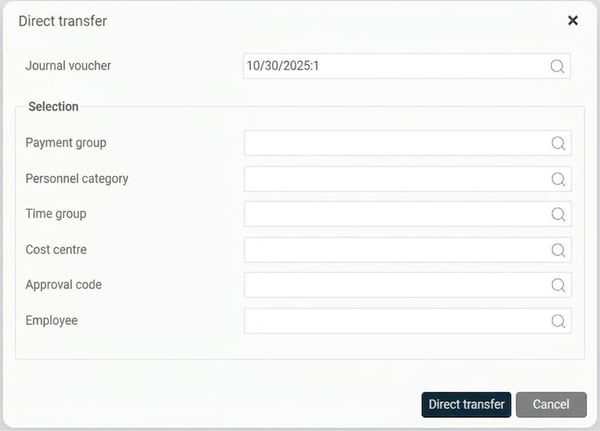
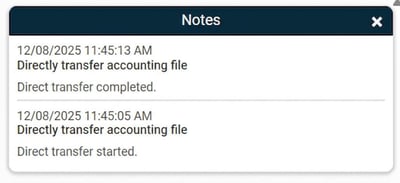
Once you have made your selections, click on Direct transfer in the pop-up and the system will automatically transfer the journal voucher to Visma.Net. If the transfer is successful, you will receive a notification confirming that everything went smoothly.
Troubleshooting
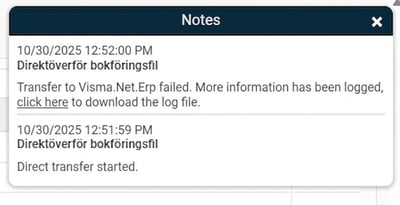
If something goes wrong with the transfer, you will receive a notification containing a link to download a log file with more detailed information about what went wrong.
Please note: This article is AI-translated. This means that linguistic errors or misunderstandings may occur.