
Self-notification is only used in companies with Norway as the home country.
The reminder for self-notification sends a notification or an email when an employee has reached the set thresholds for the number of days per year or number of days per occasion.
Inthe settingsfor self-notification are found under Settings > Time and Plan > Reason for absence.
Activate and configure the reminder
You configure the reminder Self-notification quota met under Settings > General > Reminders.
Here you can:
- Select which employees the reminder should apply to.
- Choose whether the reminder should be sent to the employee, specific users, or users with a certain role.
- Choose whether the reminder should be sent by email, as a notification in the mobile app or both.
How the control works in the system
The system performs a check every time an absence of the self-notification type is saved, reviewed, imported or stamped. A registration of self-notification cannot be saved if it causes the employee to exceed the set thresholds.
The reminder checks if the thresholds would be exceeded if an additional day with self-notification is added tomorrow, or the day after the until-date (if the absence is registered forward in time).
If such an extra day would generate an error because of too many self-notification days within the employer period or per year, the reminder is sent out.
Example of when the reminder is sent
The reminder is sent out when the quota is full.
- No reminder is sent: If the employee has 2 of 3 permitted days.
- Reminder is sent: If the employee has 3 of 3 permitted days, because a fourth day could not be saved.
Example
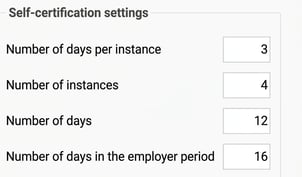
The setting states that self-notification can be used for 12 days per year and that the max. number of days per occasion (employer period) is 3. The number of days in the employer period is 16.
Employee 42 has had self-notification on 3 occasions during the last year, totalling 8 days.
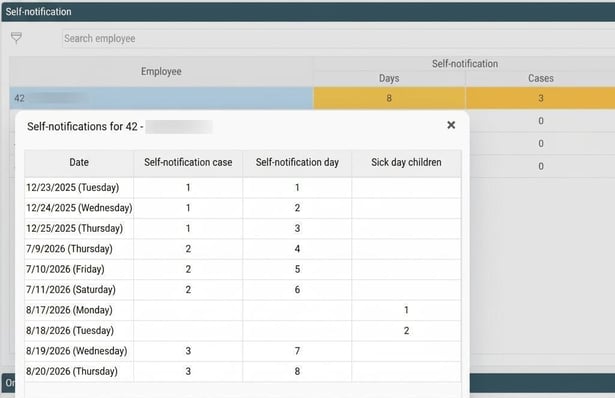
She registers self-notification on the 20th–22nd of September, so 3 days.
The number of days with self-notification is 11 after this absence. It is therefore possible to register one more day, so no reminder is generated because the number of days during the year is under the limit.
The reminder is, however, generated due to the setting for Number of days per occasion. The maximum is 3, which has been reached. A fourth day could not be saved, so the reminder is sent out.

Please note: This article is AI-translated. This means that linguistic errors or misunderstandings may occur.