
Manage payment groups
Go to Settings > Payment groups You will then see the following view:
-
Name: Here you specify the name (in plain text) for the current payment group. The name is shown in the payroll preparation.
-
The company's standard: Tick this box if the payment group should apply as the company standard.
-
Tax deduction according to table for: Specify the tax table to be used for calculation of preliminary tax for the current payment group.


Rules for payroll periods
To receive a proposal on payment date, payroll period and discrepancy period when you create a new payroll run, you can set rules for this in the selected payment group. The rules you specify vary depending on whether payment is made per month, week or every other week, according to the setting Tax deduction according to table for.
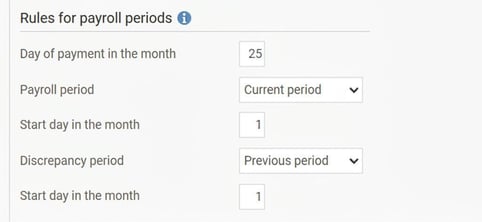
Rules for monthly payment
-
Day of payment in the month (default: 25): Here you specify which day in the month you normally make the payment. If the specified day in the month is not a banking day, the system suggests the first banking day before this date.
-
Payroll period: Here you choose whether the payroll period should coincide with the payment date (current period) or be the period before the payment date (for example, in arrears monthly salary). You also specify a start day in the month for the payroll period, which can be used if you have a broken accounting period.
-
Discrepancy period: The discrepancy period is normally always the previous period, but you have the option to choose a period coinciding with the payment date if required. You also specify a start day in the month for the discrepancy period, which can be used if you have a broken accounting period.
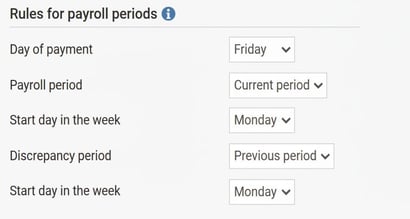
Rules for weekly/fortnightly payment
-
Day of payment (default: Friday): Here you specify which day of the week you normally make the payment. If the specified day of the week is not a banking day, the system suggests the first banking day before this date. For fortnightly salary, the payment date will be this weekday, but every other week.
-
Payroll period: Here you choose whether the payroll period should coincide with the payment date (current period) or be the period before the payment date (previous period). You also specify a start day in the week for the payroll period.
-
Discrepancy period: The discrepancy period is normally always the previous period, but you have the option to choose a period coinciding with the payment date if required. You also specify a start day in the week for the discrepancy period.
Overview list
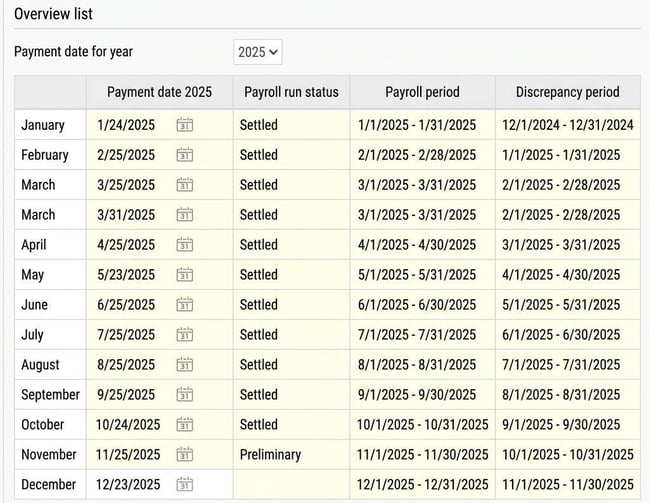
This list gives you an overview of all created and planned payroll periods during the year you have specified in the field Payment date for year. Please note that any additional payments are not shown, only ordinary payroll payments. If you wish to change any of the dates for planned payments, you can manually select another date in the list.
Please note: This article is AI-translated. This means that linguistic errors or misunderstandings may occur.