
Reverse payroll transactions from earlier payroll runs
If you need to correct a payment or a deduction from an earlier payroll run, you can do so in an upcoming payroll run in two different ways:
- Via a correction pay code (deduction for repayment or allowance for payment)
- By reversing the same pay code originally used
Reverse a paid allowanceImportant: Pay codes you reverse become locked (a padlock is shown to the left in the payroll process) and will not be included in a retroactive calculation (if the pay code is set to be calculated retroactively), only the original transaction will be included and must then be adjusted manually.
If a paid allowance needs to be withdrawn, do as follows:
- Enter the original pay code.
- Specify, where applicable, the date, extent, and quantity (same as in the original transaction).
- Enter the amount with a minus sign (–) in front.
Example
An incorrect pay rise was paid out in the July payroll and is reversed in the August payroll:
- Correction via deduction pay code: Use a pay code with the salary type Deduction. If the amount needing correction was taxable, the deduction also needs to be set as taxable.

- Correction using the original pay code: Reverse the original pay code with a negative amount.

If you need to reverse an absence deduction, do as follows:
- Enter the original pay code for absence.
- Specify the same details as in the original transactions for date, extent, and a minus sign (–) in front of the number of days or hours to be reversed.
- Save.
When you save, the system calculates a positive amount.
The original transaction needs to be reversed so that only the correct absence remains, as this could affect, for example, holiday calculations.
Example
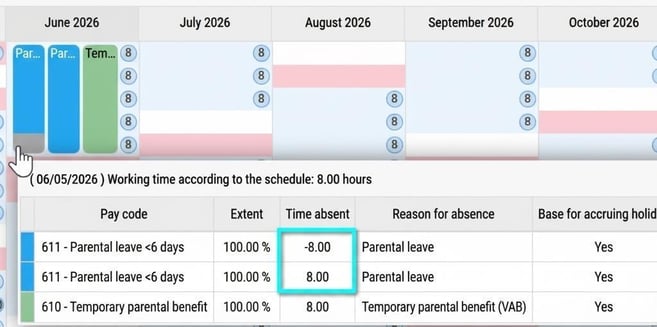
A parental leave deduction made in the July payroll is reversed in the August payroll, and a deduction for temporary parental benefit is instead entered for the same days.

Absence in the calendar
In the calendar, all transactions are shown. Parental leave will be zero (0) because periods of absence are summed automatically.
Please note: This article is AI-translated. This means that linguistic errors or misunderstandings may occur.