
Share front page documents
On the Front page you can upload documents for others to access. Common front page documents include information for employees, such as policies, information letters, instructions and manuals.
On the front page you will find Documents. Click on + for Add new documents.
- Select file
- Enter Name and any description.
- Select Document Category
- Under Share with choose which roles or users you want to share the document with.
- Save
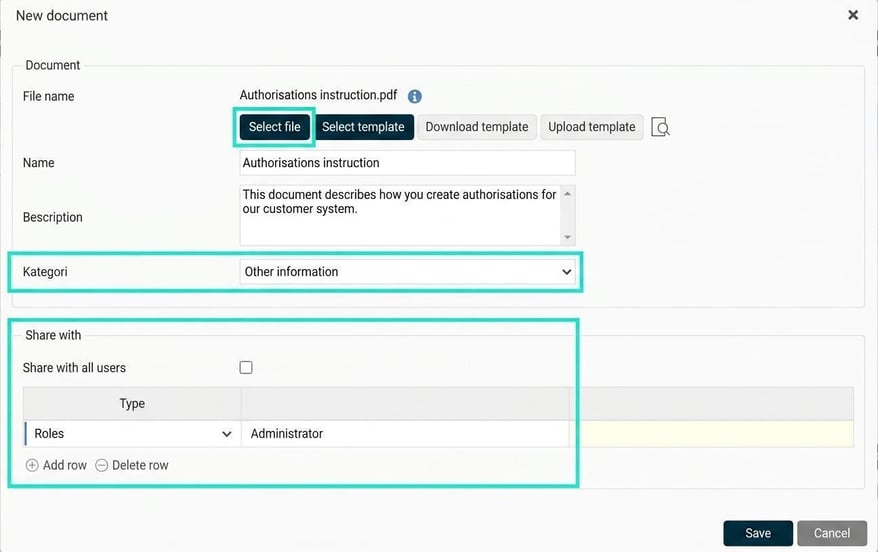
The document has now been published under Documents for the users you have shared it with.

Authorisations - Front page
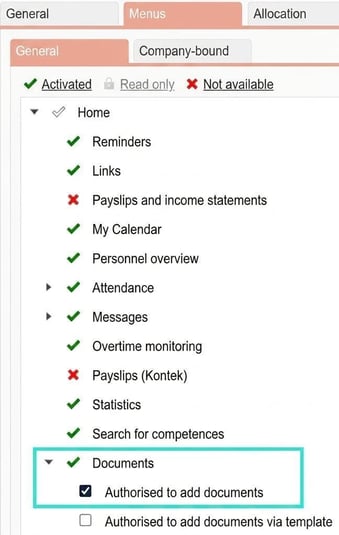
To be able to share a document with others via the front page, you need to activate the relevant authorisation for the roles under Roles.
You need a role that gives you authority to add documents to the front page.
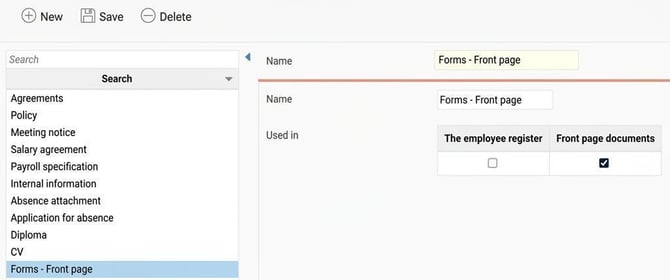
Please note that the box below also needs to be ticked for the document categories that should be selectable on the front page. Check which categories can be used for the front page under Document categories.
Please note: This article is AI-translated. This means that linguistic errors or misunderstandings may occur.