
Account code from pay code on expense code
Account code from pay code
Account code for VAT
Account code from travel time regulations
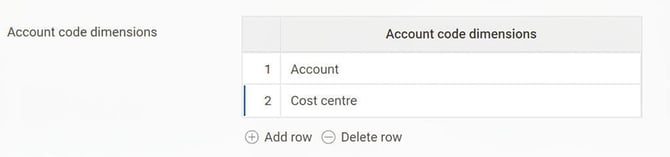
Under Settings > Payroll > Payroll connection you set which account code dimensions should accompany the payroll transactions.
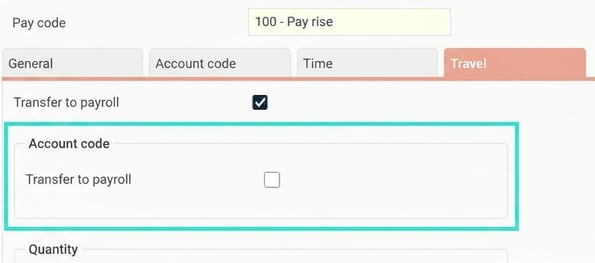
You kan also specify in the pay code register per pay code whether account codes should be sent to payroll. This means you can set the cost centre to transfer to payroll, but not for pay code 100.
Account codes can be registered in the travel expense claim, but can also be generated from settings.
Tip! Do you want to see which account codes apply to payroll transactions? Use the report Payroll specification, preliminary. It shows account codes based on what is transferred to payroll, not what is displayed in the travel expense claim.
Please note that it shows all account codes, without regard to the payroll connection's or the pay code's settings for transferring account codes to payroll.
Account code from pay code on expense code
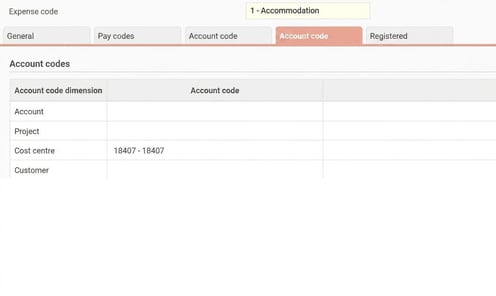
Under Settings > Travel > Expenses & Entertainment > Codes, the folder Account code you can specify account codes per expense code.
On the folder Pay codes you specify which pay code should be transferred to payroll, and there you can link account codes.
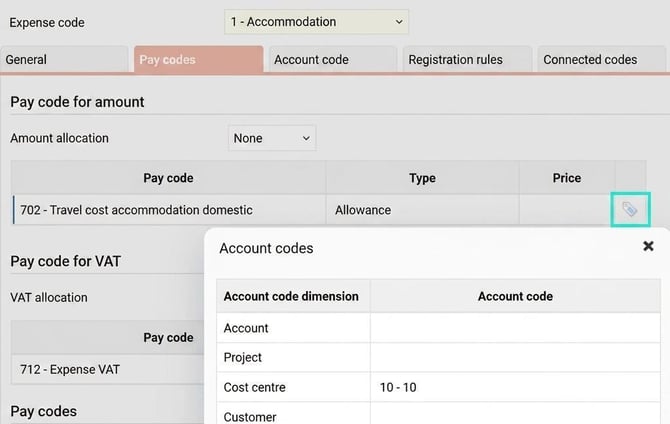
If you set a cost centre on the folder Account code and a different one on the folder Pay codes, then the cost centre from the folder Account code is shown in the travel expense claim. In the transfer to payroll the cost centre from the folder Pay codes will be sent.
Account code from pay code
Account codes can be linked to pay codes under Settings > Payroll > Pay codes, the folder Account code. These can be sent to payroll, but are not added in the travel expense claim.
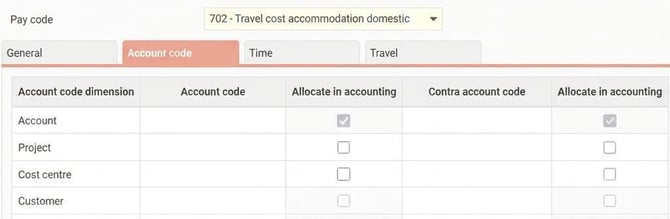
Priority for transfer to payroll if an account code has been set on the pay code in the expense code register or on the entry in the travel expense claim, but another one has been set on the pay code in the pay code register:
Expenses
- Account code on expense code, folder Pay codes, in the popup window Account code.
- Account code specified on the entry in the travel expense claim.
- Account code on pay code in the pay code register.
Subsistence allowance and car trips
- Account code specified in the travel expense claim.
- Account code on pay code.
Account code for VAT
Expense codes are often linked to one pay code for the expense and another for VAT. You set which pay code to use for VAT on the expense code under the folder Pay codes. There you can link an account code. The VAT pay code can also be linked to account codes in the pay code register.
There is also a setting under Settings > Travel > Expenses & Entertainment > General: Always use the pay code’s account codes for VAT.
The priority order for account coding to payroll for VAT is as follows:
If the setting "Always use the pay code’s account codes for VAT" is ticked:
- Account code on expense code, folder Pay codes, pay code for VAT, in the popup window Account code.
- Account code on VAT pay code in the pay code register.
If the setting "Always use the pay code’s account codes for VAT" is not ticked:
- Account code on expense code, folder Pay codes, pay code for VAT, in the popup window Account code.
- Account code specified in the travel expense claim.
- Account code on VAT pay code in the pay code register.
Account code from travel time regulations
Travel time regulations are set under Settings > Travel > Travel > Travel time regulations. On the folder Account code you can specify account codes per regulation. There is also a folder for Pay codes. There you set which pay codes apply to travelling time, and you can link account codes to each row.
Account codes for travel time regulations are never visible in the travel expense claim. They are added to the transactions relating to travelling time and transferred to payroll.
Priority order for account coding of travelling time:
- Account code on the folder Account code in the travel time regulation.
- Account code on the trip in the travel expense claim.
- Account code specified per pay code on the folder Pay codes in the travel time regulation.
- Account code specified in the pay code register for pay codes triggered by the travel time regulation.
Please note: This article is AI-translated. This means that linguistic errors or misunderstandings may occur.