
If you have made a break during an international trip, for example to take a few days off at the business location, you can register a break in the trip.
Register break in the trip
- Specify the date and time you arrived in the country on the row for Country.
- Specify the date and time when the break started on the same row.

- Click on Add break. A new break row is created and automatically gets the date and time from the row above.
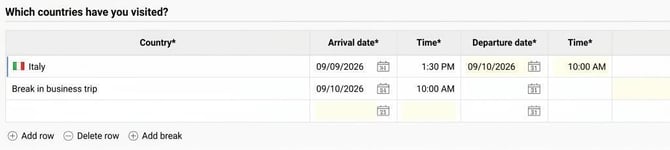
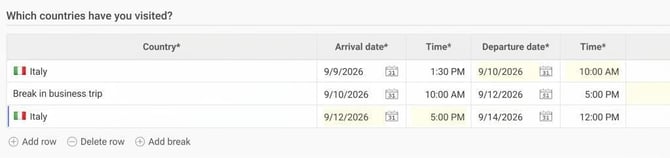
- On the break row, specify the date and time when you resumed the trip.
- After the break, enter on the next row which country the trip continued in and when you left it.
Travel starting or ending abroad
If you have Sweden as your home country, you can also tick the following boxes if you started a trip abroad or chose to end a trip without travelling back home:
- The travel began abroad
- The trip ended abroad
Please note: This article is AI-translated. This means that linguistic errors or misunderstandings may occur.