
Tax adjustment in percentage or kronor
If the Employee has received a decision on tax adjustment, specify the type of tax adjustment to be applied in the field Tax adjustment type.
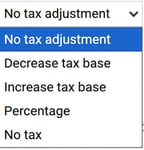
Depending on your selection, additional fields will be displayed that need to be filled in.
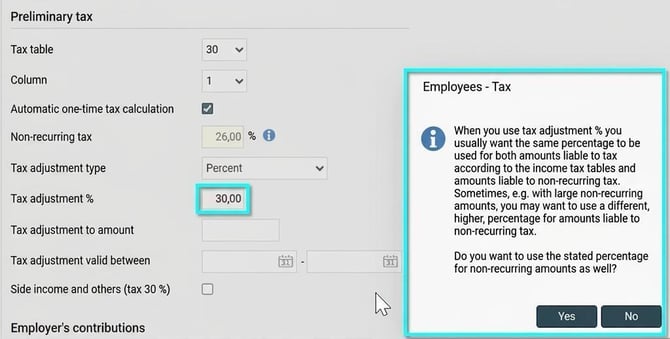
Tax adjustment in percentage
When you use tax adjustment in percentage, you usually want the same percentage rate to apply to both liable to tax according to the income tax tables and one-off tax amounts. Once you have entered a percentage in the field Tax adjustment % a dialog box appears. Here, you respond Yes or No to the question whether you want to use the percentage for one-off amounts as well.
Amount adjustment (decrease or increase tax base or no tax)
Specify the tax adjustment amount in the field Tax adjustment kr.
In the field Tax adjustment up to amount you can set a maximum amount if the adjustment should only apply as long as the annual income does not exceed this threshold.
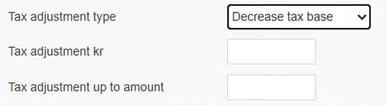
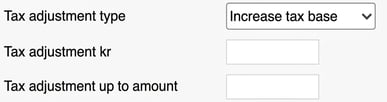

- With maximum amount: During the payroll period when the Employee exceeds the threshold, the tax adjustment ceases.
- Without maximum amount: If you do not specify any 'until' amount, the adjustment will be applied regardless of the size of the annual income.
Tax adjustment valid between
In Tax adjustment valid between you specify whether the tax adjustment decision only applies for a limited part of the year:

- Limited period: If you make a payment before or after the dates you have specified, no tax adjustment will be applied.
- Whole year: If you do not enter any dates, the tax adjustment will be applied throughout the entire year.
Please note: This article is AI-translated. This means that linguistic errors or misunderstandings may occur.