
If an employee is to be taxed according to a decision on Specific payroll tax (SINK) you need to register this in the Employee register.
Follow the steps below:
-
Go to the employee register.
-
Go to the Tax tab.
-
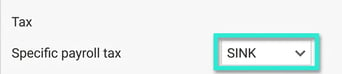
Select SINK in the field for Specific payroll tax.
-
Specify a tax adjustment in percent (%) in the field Tax adjustment in %.
-
Specify the rate to be applied in the field Percentage rate.

Please note: This article is AI-translated. This means that linguistic errors or misunderstandings may occur.