
How to register tax exemption
Follow these steps to set up tax exemption using the tax adjustment function for an employee:
-
Go to Employees > Employee register.
-
Select the relevant person from the list.
-
Go to the tab Tax.
-
In the field Tax adjustment type, choose the option No tax.
-
Specify the highest amount the employee may earn without tax in the field Tax adjustment up to amount.
-
Specify the period for which the tax adjustment should be valid in the fields Tax adjustment valid between.
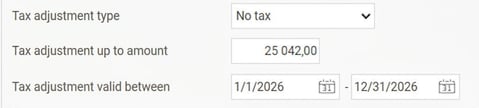
Once these settings are saved, the system will automatically stop deducting tax from the employee’s wage until the specified maximum amount has been reached or the validity period has expired.
Note: FOS-requests should not be used for these employees as it will overwrite the registered tax adjustment.
Please note: This article is AI-translated. This means that linguistic errors or misunderstandings may occur.