
Set up a customised import template for Volvo cars
This article explains how to set up an import template for trip logs from Volvo cars.
Create the import template
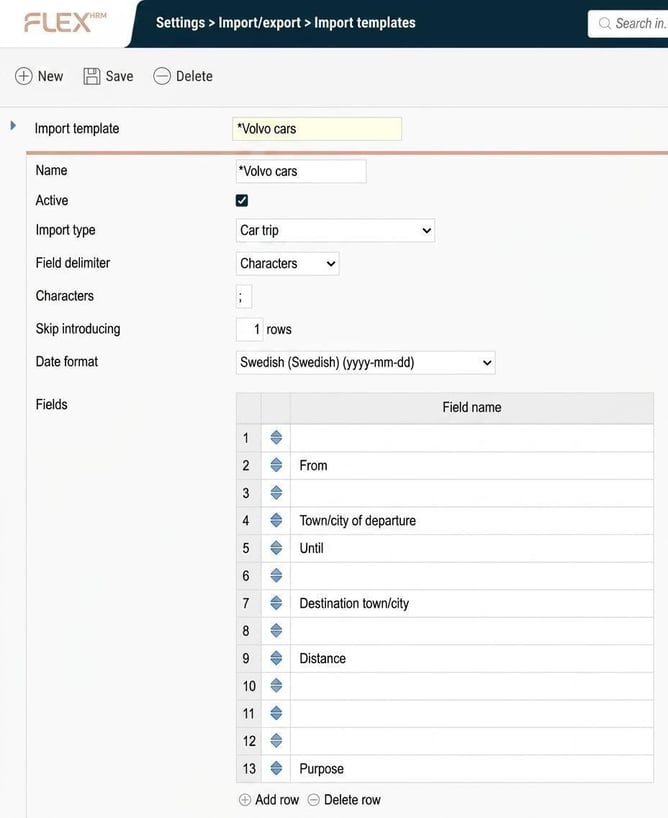
Start by creating an import template that matches the format of the CSV file from your Volvo cars app.
-
Go to Settings > Import/export > Import templates.
-
Create a new template and name it Volvo cars.
Create import action jobs
To allow your employees to import the files, you need to set up an action job.
-
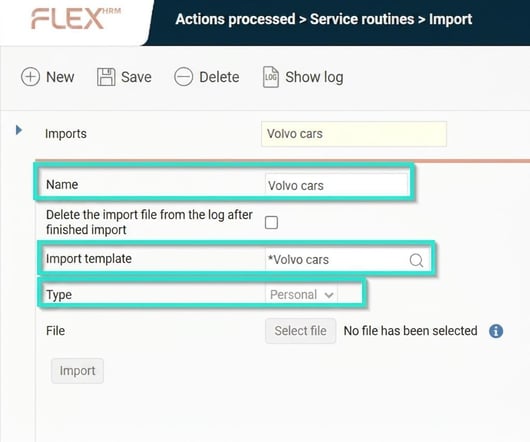
Go to Actions processed > Service routines > Import.
-
Fill in the following fields:
-
Name: Volvo cars
(This is the name shown when employees import their file.)
-
Import template: Volvo cars
-
Type: Personal
-
Tip! Do you want to know how to export the driving record from Volvo cars? Click here
Please note: This article is AI-translated. This means that linguistic errors or misunderstandings may occur.