
End of employment causes
Click on Settings > Personnel and select End of employment causes from the menu.
You will then see the following view:
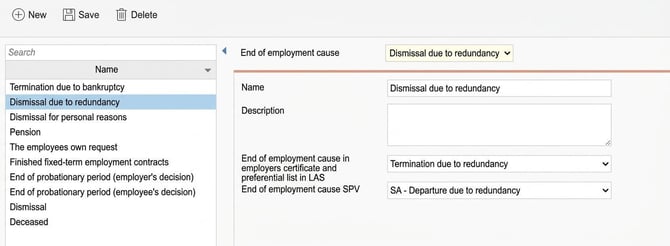
The list on the left displays any previously entered end of employment causes. On the right, you can specify/view details for each end of employment cause.
- Specify a name for the end of employment cause and, if applicable, a description.
- Specify the reason for departure in the employers certificate and the priority list in LAS
- If you use HRM Payroll, you should also specify which cause of termination should be reported to SPV.
You can now specify the end of employment cause in the employee register, folder Employment, once you have entered an end date for an employee.
End of employment cause per employee can also be imported and exported via import templates/export templates. When importing an end of employment cause, Start of employment and End of employment should always be imported together, so that the system knows to which employment period the end of employment cause relates.
Please note: This article is AI-translated. This means that linguistic errors or misunderstandings may occur.