
Create time codes for sick leave unsocial hours allowance
Set up rules for sick leave unsocial hours allowance
Time code setting to allow combination with unsocial working hours
Delete sick leave unsocial hours allowance
Create time codes for sick leave unsocial hours allowance
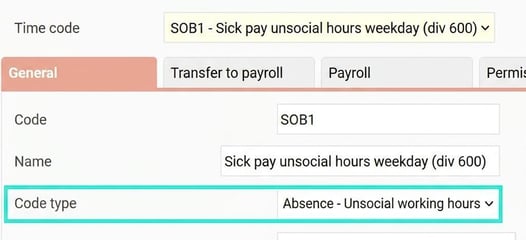
For sick leave unsocial hours allowance to work, you need time codes for it. You can copy your existing unsocial working hours- time codes and change the new time codes to code type Absence - Unsocial working hours. Ensure that each time code is linked to the correct pay code for allowance. Code type is set under Settings > Time and Plan > Time codes > General tab and pay code on the tab Transfer to payroll.
Set up rules for sick leave unsocial hours allowance
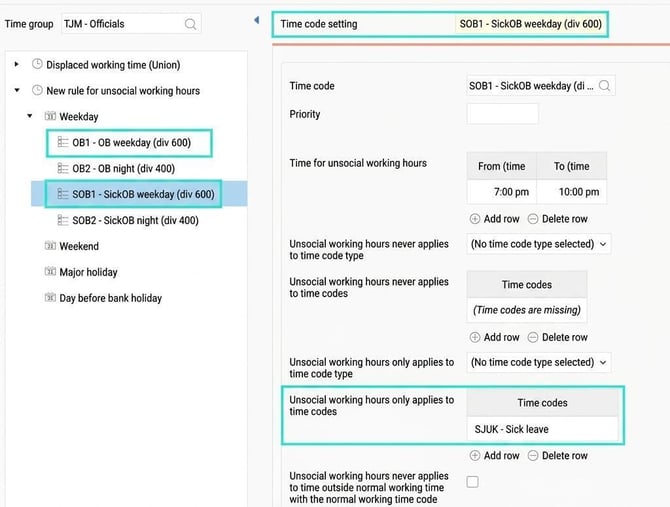
In the unsocial working hours- regulations, you need to create rules for sick leave unsocial hours allowance. These rules often mirror your usual unsocial hours rules. For example, if you have an unsocial hour rule stating that OB1 should be applied between 19:00 and 22:00, you create a corresponding rule for Sick-OB1 which also applies between 19:00 and 22:00.
The sick leave unsocial hours allowance (sick-OB) rules should be set to apply together with the time code for Sick leave.
Time code setting to allow combination with unsocial working hours
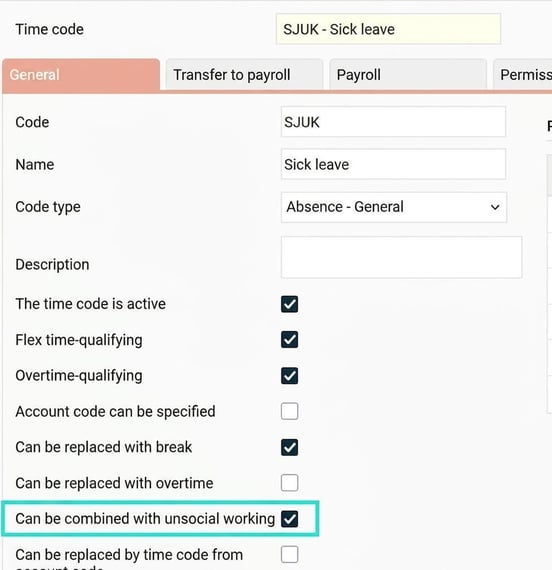
For the system to calculate Sick leave unsocial hours allowance correctly, make sure the time code for Sick leave can be combined with unsocial working hours. You set this up in the time code registry, using the setting Can be combined with unsocial working hours.
Delete sick leave unsocial hours allowance
The system initially calculates sick leave unsocial hours allowance for all sick days, regardless of the period of illness. Every night, an automatic process removes sick leave unsocial hours allowance from reviewed days according to the setting Days ahead of unsocial working hours which can be set per employee, timegroup, or for the entire company.
There is also a check during payroll transfer, so if the time report is reviewed on the same day as payroll processing, sick leave unsocial hours allowance is removed during the transfer to payroll.
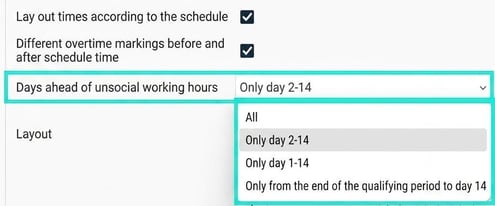
The setting Days ahead of unsocial working hours can be:
-
All days: Sick leave unsocial hours allowance applies to all days in a period of illness, regardless of length.
-
Only day 2-14: Sick leave unsocial hours allowance is removed from the first sick day and from day 15 onwards.
-
Only day 1-14: Sick leave unsocial hours allowance is removed from day 15 onwards.
-
Only from the end of the qualifying period to day 14: Sick leave unsocial hours allowance is removed during the first twenty percent of the weekly working hours and from day 15 onwards. The qualifying period is the actual weekly working hours divided by five. If you work weekdays 8 am-5 pm, that equals eight hours. More examples below.
Example qualifying period
1: Say you work 22:00-07:00 (60 min break) five days per week. This gives an actual weekly working time of 40 hours, 40/5 is 8 hours.
You go home sick Tuesday morning at 05:00 and are off for the rest of the week. This gives 2 hours qualifying period Tuesday at 05:00-07:00 and 6 hours Wednesday -22:00-05:00. Sick leave unsocial hours allowance will therefore apply from 05:00 on Wednesday as the qualifying period is eight hours.
2: You have a contractual working hours of 50%, actual working time per week is 20 hours. Qualifying period: 20/5 = 4.
You work ten-hour shifts on Mondays and Tuesdays, 19:00-06:00. If you are sick for a week, sick leave unsocial hours allowance is removed from the first 4 hours on Monday.
Related
How do unsocial working hours- regulations work?
Please note: This article is AI-translated. This means that linguistic errors or misunderstandings may occur.