
Automatic adjustment of number of hours full-time
If you have intermittent absence part time and are completely off some days, some payroll systems require the number of hours full-time to be distributed over the working days. You can either do this calculation manually or let the system perform it automatically.
In the time report settings, available per company/time group/employee, you can now enable this setting:
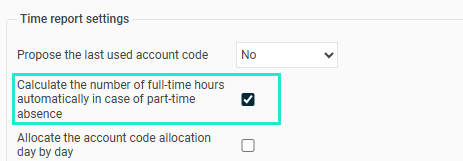
For those with absence part time according to the schedule (not fixed percentage), the number of hours full-time will automatically be calculated for all days according to the formula:
Actual schedule time / (100 - Absence percentage) / 100
An example with an employee who usually works 40 hours per week but who has 30% absence part time and works 8 hours Monday to Wednesday and 4 hours on Thursday, the number of hours full-time for each day will be as follows:
Mon: 8 h / (100 - 30) / 100 = 11.43
Tue: 8 h / (100 - 30) / 100 = 11.43
Wed: 8 h / (100 - 30) / 100 = 11.43
Thu: 4 h / (100 - 30) / 100 = 5.71
Fri: 0 h / (100 - 30) / 100 = undefined
Sat: 0 h / (100 - 30) / 100 = undefined
Sun: 0 h / (100 - 30) / 100 = undefined
Please note that this automatic calculation of number of hours full-time also takes place when manual schedule changes are made on individual days.
Tip: Do you want to read about other settings in the system relating to absence part time click here.
Please note: This article is AI-translated. This means that linguistic errors or misunderstandings may occur.