
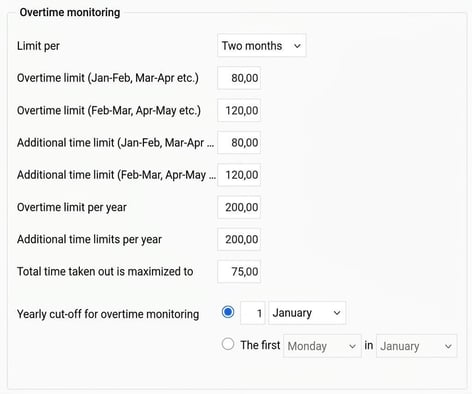
If you have agreements that regulate overtime for two-month periods, you can use the overtime monitoring settings to process this. Flex HRM can then monitor two different periods simultaneously: one starting with an even month (Jan–Feb, Mar–Apr, etc.) and one starting with an odd month (Feb–Mar, Apr–May, etc.).
To activate this function, go to the following location in the system:
Settings > Time and Plan > Time groups > Time tab
There, extra fields for overtime limits/additional time limits will be shown for those using overtime monitoring with a two-month period. By filling in values for these fields you will then be able to see both of the two periods that match the selected month.
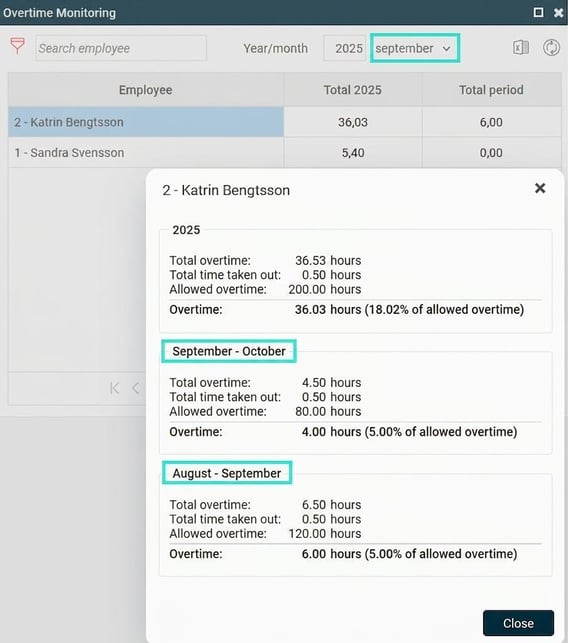
View overtime periods for an employee
To view the overtime periods for a specific employee, go to the front page. There, click on the blue i next to the employee's name in overtime monitoring. This will show both of the different periods that match the current month.
Please note: This article is AI-translated. This means that linguistic errors or misunderstandings may occur.