
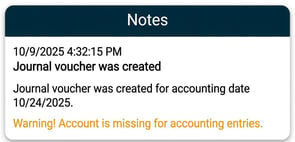
Find the pay code that is missing an account
To see which pay codes are missing an account, follow these steps:
-
Select the journal voucher you have created and click on Print.
-
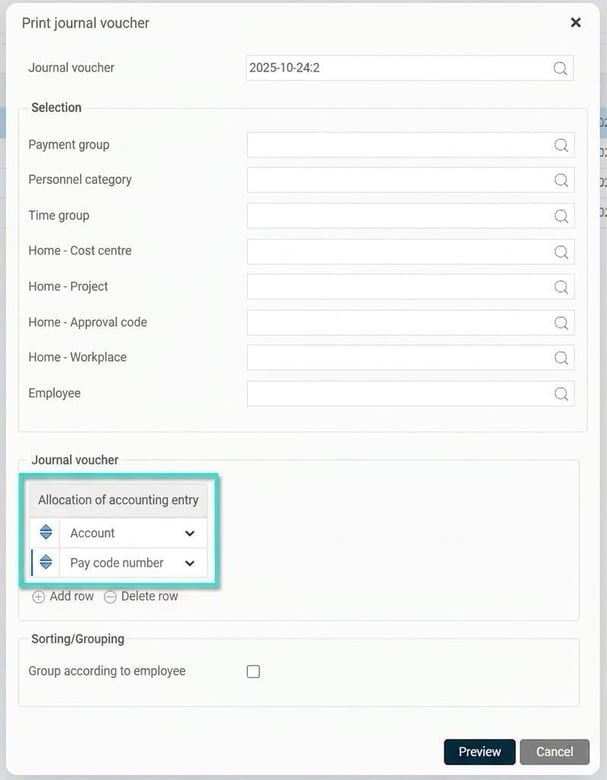
In the selection window that opens, change the settings for the allocation entry so that you only include account and pay code. Then click on Preview.
-
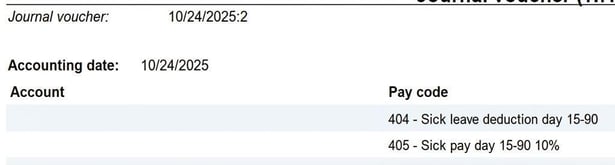
When the journal voucher is displayed, you can go through it to see which pay codes are missing an account.
Fix the missing account
Once you have identified the pay code, there are two ways to add the missing account.
-
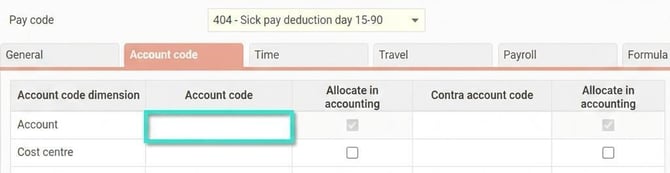
Add account directly to the pay code If the same account should be used for the pay code regardless of employee, you can add it directly in the pay code's settings under the Account code tab.
-
Account code the salary transaction during payroll preparation If the account differs between employees for the same pay code, you instead need to find these employees and account code the salary transaction in payroll preparation. Here, for example, you can use the report Allocation Number & Amount with a selection on the relevant payroll run and pay code.
If you adjust the setting directly on the pay code, you need to resave the payroll run for all employees who have this pay code. The easiest way to do this is by completing the payroll run for all without importing any new transactions. All will then be resaved with the existing transactions.
Check that everything is correct
After you have added the account and resaved the payroll run, you need to create a new journal voucher to check that the account coding is correct.
Please note: This article is AI-translated. This means that linguistic errors or misunderstandings may occur.