
This product is under development. The content of the article will be updated as new changes are made.
What is a job function?
What is a job family?
The purpose of a job architecture is to help you sort and categorise your works in a logical hierarchy. Here you can read more about how it works and how to set up your architecture.
Why is Job Architecture important?
Job architecture helps you to:
-
Create consistency in how you name and evaluate different roles.
-
Make career paths visible and responsibility levels within the company.
-
Simplify analysis of pay gaps by grouping works with similar requirement profiles.
How Job Architecture Works
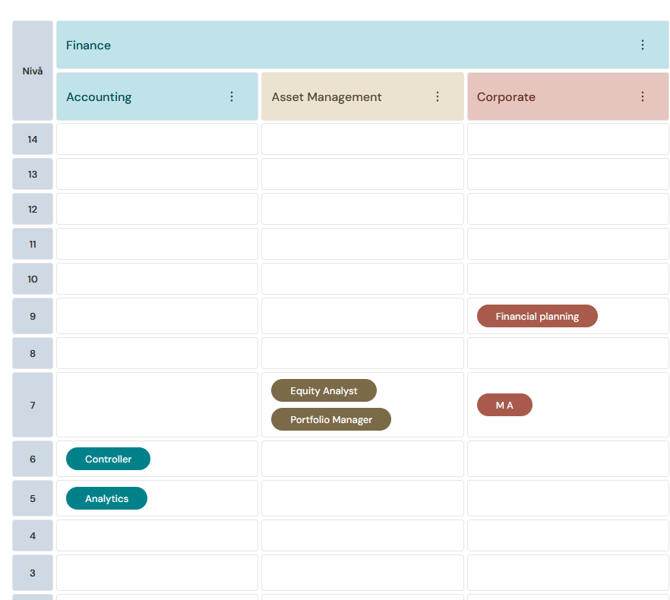
Once you have created job functions, job families, and job profiles, and completed a work evaluation, you can get a clear overview of the structure in the matrix under Pay Equity Compass > Job Architecture.
The levels are automatically controlled in the background based on the job profile's work evaluation points. By grouping your job profiles into families and functions, you can quickly see which jobs are content-related, regardless of where the employees are located in the organization.
You can click on a job profile in the matrix to view a popup with detailed information about it.
What is a Job Function?
A job function is the highest level in your job architecture. It is a broad category that gathers multiple related job families under one roof. These groups help you divide the organization into large, logical blocks based on business areas.
How does it all connect?
Think of it as a tree where the trunk is the company, the large branches are job functions, and the smaller twigs are job families. At the very end of the twigs, you find the specific job roles.
Example of a job function with its job families and positions:
Within the Finance job function, you might have the Accounting job family. This is where you gather roles such as controllers, accountants, and analysts. Even if one analyst is based in the marketing department and another is in the production department, they belong to the same job family and job function.
This gives you a fair overview that reflects the organization's actual areas of expertise rather than the reporting structure.
How to Create a Job Function
- Go to Pay Equity Compass > Job Architecture.
- Click on Add Job Function.
- Enter a name and add a description.
- Click on Save.
How to Edit or Delete a Job Function
To edit/delete an existing job function:
- Go to Pay Equity Compass > Job Architecture.
- Find the job function in the matrix.
- Click on the three dots.
- Select Edit or Delete.
- Make and confirm your change.
Note: It is not possible to delete job functions that have been linked to job families.
What is a job family?
A job family is a logical grouping of roles that have similar duties, competence requirements or belong to the same area of operations. It's a way to organise all positions in the company into 'categories' for structure and overview, regardless of how senior the roles are.
Think of the job family as the horizontal axis in your job architecture:
-
It describes what people work with (for example, Maintenance & Property or IT & Digitalisation).
-
The aim is to facilitate career planning, market salary comparisons, and to create an understandable structure for employees.
What is the difference between a Job family and Equivalent works?
It is important not to confuse the job family with the grouping that takes place through work evaluation.
-
Job family (Horizontal): A grouping based on content.
In a family named Maintenance & Property everything from an Industrial Electrician to a Property Caretaker is included. They perform similar tasks, but their roles vary in degree of difficulty. - Level/Equivalent work (Vertical): A grouping based on value (points). Through work evaluation, a role in the job family Maintenance & Property can end up at the same level as a role in the job family Finance because they have received equivalent points. This is because they received equivalent points in the work evaluation even if they are not in the same job family. This vertical axis helps you check for unjustified pay gaps according to legal requirements.
Example of structure in the system
Your job architecture might look like this for a job family:
| Job family: Maintenance & Property | |
| Role | Level (based on score) |
| Maintenance Engineer | Level 14 |
| Industrial Electrician | Level 13 |
| Property Caretaker | Level 11 |
By using clear families, it becomes much easier for you to explain to an employee why they are within a certain salary range. It shows that the salary is based on the actual value of the work and the position of the role in the structure, rather than arbitrary decisions.
Here's how to create a job family
Once you have your groups ready, the next step is to create specific job families.
-
Go to Pay Equity Compass > Job Architecture.
-
Click on Add job family.
-
Specify a name and description for the family.
-
Click on Save.
Here's how to edit or remove a job family
To edit/remove an existing job family:
- Go to Pay Equity Compass > Job Architecture.
- Find the job family in the matrix.
- Click on the three dots.
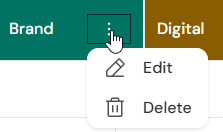
- Select Edit or Delete.
- Execute and confirm your change.
It is not possible to delete job families that have been linked to job profiles.
Related articles
Getting started with the Pay Equity Compass – Checklist
Please note: This article is AI-translated. This means that linguistic errors or misunderstandings may occur.