
Manage absence applications in the app
When an employee has submitted an application for absence that you need to audit, it appears on the front page under To do > Absence to manage.
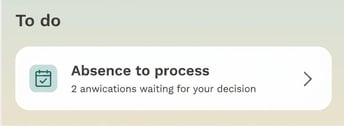
- Click on Absence to manage to open the absence audit view.
- The applications you need to process are shown in this view. Those with the nearest dates are shown at the top.
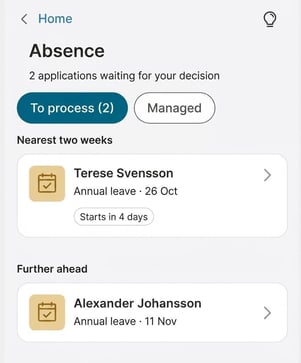
- Click on an application for absence to view the details and choose whether to approve or reject it.
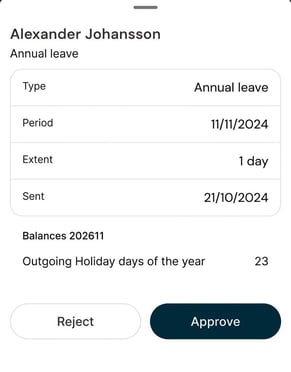
Which applications for absence can be processed in the app?
Absence is shown under To manage if it falls today or in the future. An older unprocessed absence is shown if its date has not been transferred to payroll and if its end date is not earlier than the previous month.
You can manage absence part time specified as a fixed percentage, or where a schedule for the part-time absence has been specified.
You cannot create a schedule for part-time absence in the app; this needs to be managed in the web version of Flex HRM.
Do you have permission to review absences across multiple companies? You don’t need to switch between companies in the app; you can see requests from all employees under To do. The requests are handled in a shared view, regardless of which company the employee belongs to.
Change a previous decision
- Click on Processed to view applications you have already processed. This shows absence that you have processed in the last 30 days,.
- Select the absence you want to view to see the details.
- Click on Change decision if you need to change your previous decision.
Which applications for absence are shown to you?
For an application for absence to be shown under Absence to manage you must have set the reminder to be shown in the mobile app. Applications are shown when triggered by a reminder.
This means that, as an administrator with access to all the company's applications, you will only see the applications for which you receive a reminder.
Are reminders sent as notifications in the app?
Yes. If you have set reminders for absence that is created and processed, and the reminders are set to appear as notifications in the mobile app, the app sends a notification to:
- you when an employee has applied for absence.
- the employee when you have processed the application.
Reminders for absence registered directly, where there is no application, are not sent as notifications in the app.
What is required for you to see absence applied for in the app?
To see an application for absence under To do and receive a reminder notification, the following is required:
- You must be authorised to audit the application for absence.
- A reminder must be set up in the system.
- The reminder must be set to be sent to you and displayed as a notification in the mobile app.
Did you receive the notification Absence to review, but the request doesn't appear under Absence to handle?
If multiple people can review the same request, a colleague may have gotten to it first. In that case, it will appear neither under To handle nor under Handled for you. The notification remains because the request was still pending when it was sent, and a notification already on your phone is not revoked when someone else approves or rejects it.
Please note: This article is AI-translated. This means that linguistic errors or misunderstandings may occur.