
This product is under development. The content of the article is updated automatically as new changes occur.
You can recalculate an existing Pay Equity Navigator if you need to update it with new changes, for example if an employee has received a new salary, changed contractual working hours, or if a completely new colleague has started.
How to update your Pay Equity Navigator
To start a recalculation, do the following:
-
Go to Overview.
-
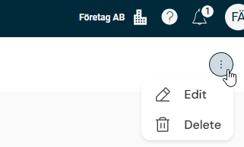
Click on the three dots in the upper right and select Edit.
-
In step one, you can, if needed, change the name and date.
Then click Next to move on to step two.
Click on Cancel if you do not wish to continue with your editing.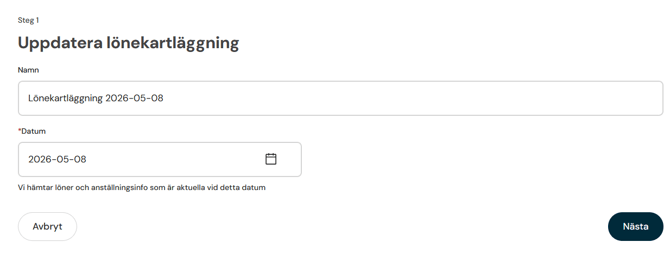
-
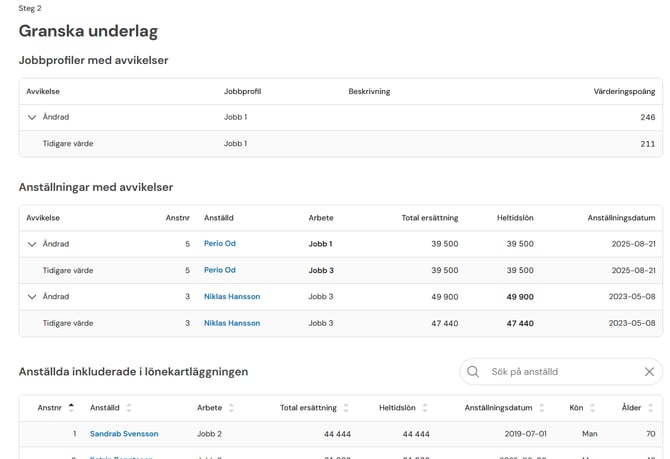
In step two, you review discrepancies for employees and job profiles. Here, you see both earlier and current values before moving on. Click on Go back if you do not wish to continue with your editing.
-
Click on Update Pay Equity Navigator. This will start a background job that recalculates the navigator. The view is updated automatically as soon as the recalculation is complete.
Saved comments are not affected by the recalculation and remain just as before.
If there are changes that mean basic information is missing, the Pay Equity Navigator cannot be updated. For example, it could be that an employee is missing a wage. You will need to resolve this before you can carry out the recalculation. You can check the requirements under Pay Equity Compass > Pay Equity Navigator to easily see what needs to be addressed.
Please note: This article is AI-translated. This means that linguistic errors or misunderstandings may occur.