
The project register can be extensive. If time is only reported for certain projects, it can be helpful to see only those and not all of the company's projects in your time report.
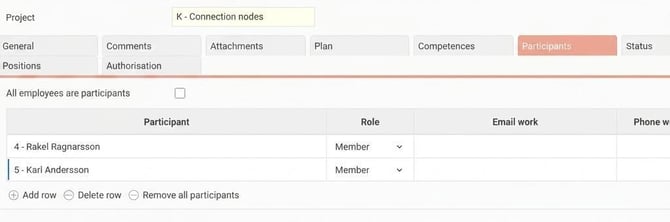
In the project register you can set up participants for a project.
In the coding dimension settings you can choose to only allow participants access to the project. This means that in your time report you can only use projects where you are listed as a participant, or where all employees are participants.
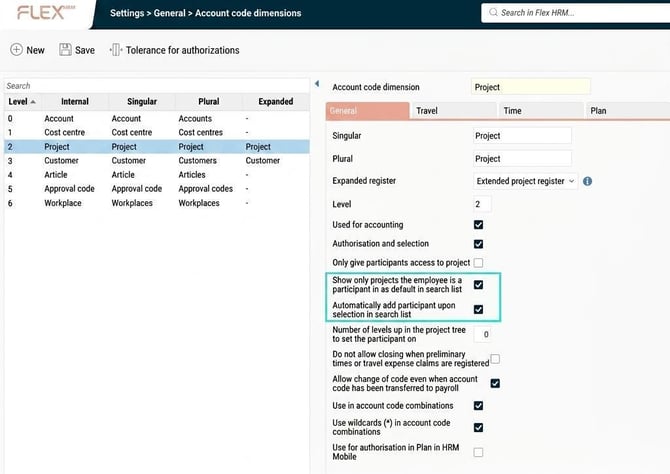
If you do not want to restrict it that strictly, but just make it easier for employees to see “their” projects, you can instead use Show only projects the employee is a participant in as default in search list.
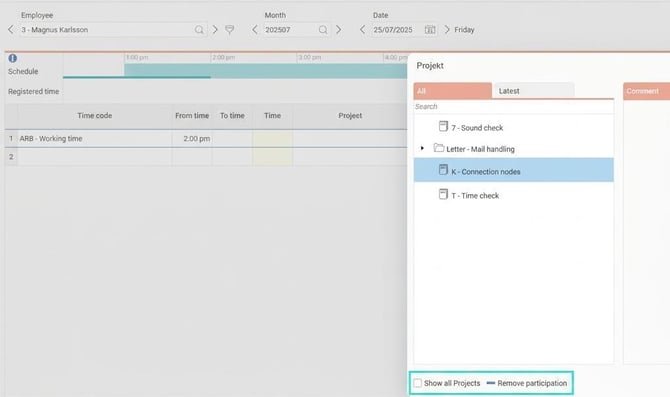
You will then only see your projects, but can choose to show all.
You can combine this with the setting that adds you as a participant in the projects you select, so that these will appear as default on future occasions (Automatically add participant when selecting in search list).
With this, you also have the option to remove yourself as a participant, so you no longer see that project by default. This does not work for projects where all employees are set as participants.
Please note: This article is AI-translated. This means that linguistic errors or misunderstandings may occur.