
Manually registering an employee who is transferring between companies within the concern can be time-consuming and increases the risk of errors. With the function Copy employee you can initiate a transfer with just a few clicks, where certain essential basic data is automatically transferred. This not only saves valuable time but also ensures that information is correct from the start in the new employment.
The following basic data is copied to the new company
- Image
- Name and National ID number
- Nationality, date of birth and gender
- Address details (including protected personal registration and address of the intermediary)
- Contact information such as email private, email work, private mobile and work mobile, including notification settings
How to use the function
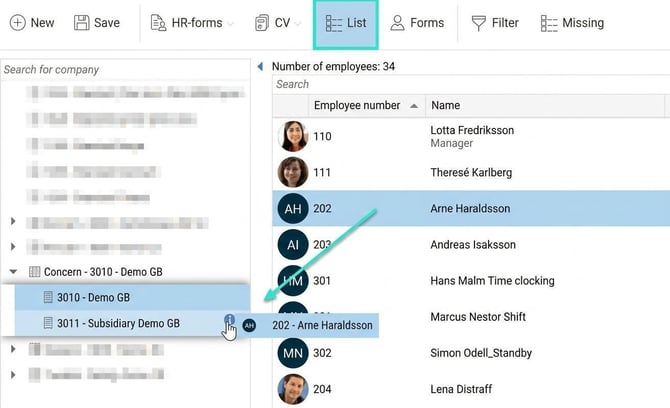
- Find the employee: In the list view of the Employee register, look up the person you want to transfer to another company.
- Drag and drop: Drag the selected employee directly to the new company. A dialog box will appear for you to confirm the transfer.
- Specify details: In the dialog box, enter the new employment number and the new employment start date for the new employment.
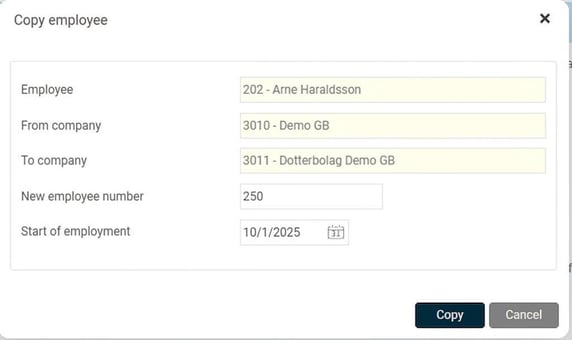
- Confirm: Click on Save. A new employment will now be created in the selected company.
Please note that employment periods are not copied, as these are often unique for each employment.
Prerequisites for using the function
To be able to use the function Copy employee the following is required:
- Your company must have a Concern licence in HRM.
- As a user, you need authorisation to see the list view in the employee register and authorisation for the function Copy employee within the group.


- You must be authorised to create a new employment and employment period.
- You need to be authorised to administer both current company and target company.
- Only users authorised for all employees in the new company will have authorisation for the newly copied employment.
Please note: This article is AI-translated. This means that linguistic errors or misunderstandings may occur.