
Create a specification

Remove a base

Check the specification

Detailed information on how the specification is created and calculated

Special procedure for on demand employees for New employees and Departures
Ongoing work for the reporting of short-term employment statistics (KSP)
Once a month, if you have been selected, you need to report short-term wage statistics to SCB. This is done in Flex HRM Payroll under Administration > Actions processed > Statistics reporting > Short-term employment statistics, private sector (KSP).
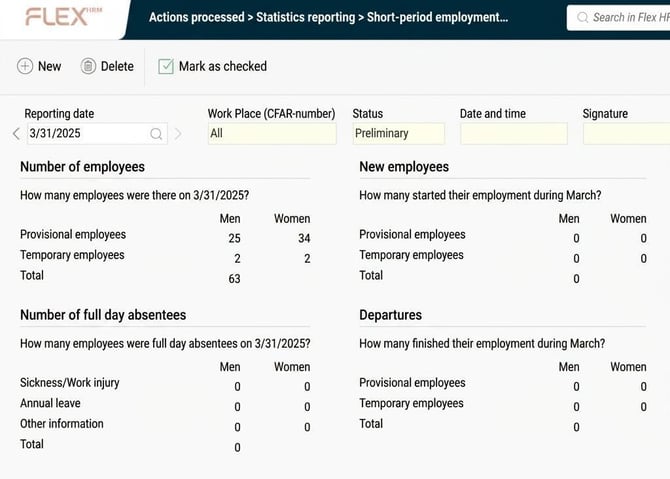
Create a specification
The first step in the reporting process is to create a specification for the date to be reported. You do this by clicking the New button in the toolbar.
Here you choose which date you want to create the reporting specification for. You can also make a selection of employees if you wish; in the selection you can also specify which Work Place (CFAR-number from SCB) you want to select. Work Place (CFAR-number) can be set on an employee.
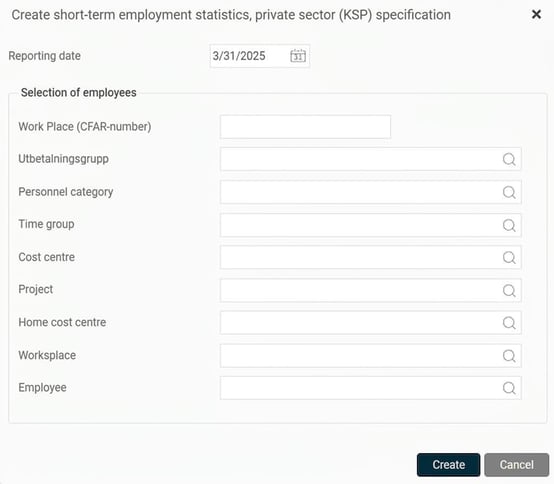
When you click the Create button, the process to create the specification begins. Once the specification is created, you will see it with the status set as Preliminary in the view.
Remove a base
If you find an error in the specification, you can remove a base to start over from scratch. You can also remove old bases that you no longer wish to keep.
Check the specification
The next step is to check the specification before you submit the information to SCB. You do this by auditing the specification in the view.
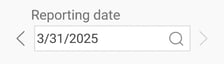
At the top of the view, select the reporting date you want to view. Previous reports remain available and are easily accessible.
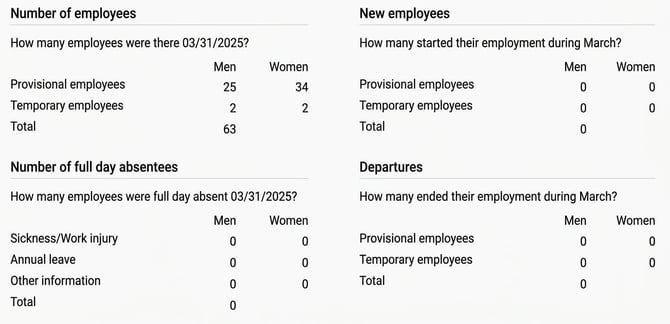
The table shows the specification that has been compiled and which will be reported to SCB.
Once the specification has been audited, you mark the specification as checked by clicking the Mark as checked button. The status of the specification then changes to Inspected. The date, time, and signature of the user who marked the specification as checked are saved to the specification.

If you spot an error in an inspected specification, you can remove the inspection marking again via the Remove the inspection marking button. This sets the status back to Preliminary.

Detailed information on how the specification is created and calculated
Below you will find detailed information on how the specification is created in the system.
Calculation for the four different questions
Below is a detailed description of how each question is calculated in the specification.
- Number of employees
How many permanent and temporary employees there are in the company, categorised by gender. Probationary employments are counted as temporary employees.
- Number of full day absentees
Here, the number of people who were absent for a full day on a given date in the measuring month is calculated. A full day absentee means time absent in relation to the employee's scheduled time, for example, for an employee working 50%, four hours count as a full working day. This is then categorised into Sickness/work injury, annual leave, and then other information distributed by the employee's gender. If there are several absence reasons, for example, 75% sick leave and 25% leave of absence, the absence reason with the most time absent applies—i.e. sick leave. If the time absent is the same, for example, 50% sick leave and 50% leave of absence, the absence reason that comes first in the following order applies: annual leave, parental leave, sickness, leave of absence and work related injury.
- New employees
Here, the number of new employees the company had during the measuring month is calculated. If an employee's employment period has a start date during the measuring month, it is counted as a new employee, taking into account gender and form of employment during the employment period.
An exception is if the employee's employment period starts during the measuring month but has a previous continuous employment period with the same form of employment; in that case, the employment period should not be counted as an ending, as it actually continues as one continuous employment period.
- Departures
Calculates how many employees left the company during the measuring month. If the employment period has an end date during the measuring month, it is counted as a departure, taking into account gender and form of employment during the employment period.
An exception is if the employee's employment period ends during the measuring month but is immediately followed by a continuous employment period with the same form of employment; in that case, the employment period should not be counted as an ending, as it actually continues as one continuous employment period.
Special procedure for on demand employees for New employees and Departures
When calculating the number of new employees and the number of resignations, employees who are on demand employees are specially handled, as described below. An employee is considered to have payroll if their period net is greater than 0.
On demand new employees should be counted as follows:
If an employee with the form of employment on demand employee lacks a start date for the employment period during the measuring month, salary payments are instead checked—if the person received salary during the current month, they are counted as a new employee.
Please note! Previous month's payroll is not taken into account for new employees, as is done for departures.
Departures of on demand employees should be counted as follows:
If an employee with the form of employment on demand employee lacks an end date for the employment period during the measuring month, payments are instead checked—if the employee has not received any salary during the measuring month but was paid the previous month, this is counted as a departure since salary payments have expired.
Please note: This article is AI-translated. This means that linguistic errors or misunderstandings may occur.