
Flex HRM provides a dedicated view under Personnel > LAS > Preferential right to re-employment, where the calculations for precedence are performed and displayed.
How to create a preferential right list
-
To create a new list, click on New.
-
Start by specifying a name for the list.
-
Specify a Calculation date / Season start date. All calculation of days in the list is made up to and including the date you specify here.
Please note that this date is not the same as Calculation time. Calculation time is shown at the top right of the completed list and indicates when the actual calculation was performed.
-
Select the type of list you want to create. You have the following options:
-
The main rule: Used when employing someone who was previously made redundant or did not have their fixed-term employment contract extended due to shortage of work or bankruptcy.
-
Preference to new SÄVA: Used when employing someone with the form of employment special fixed-term employment (SÄVA).
-
Preference for new seasonal employment: Used when employing someone for a season.
-
-
Click on Save when you have made your choices.
When the calculation is finished, the completed preferential right list will be displayed.
Calculation date / Season start date
The preferential right list calculates days up to the specified date.
If the list has a future date, for example when the next season starts, days will be calculated up to the specified date. This acts as a kind of simulation of future days.
An employment with a form of employment that is calculated based on calendar days will count all days up to the set date. An employment calculated on work days counts all days that are audited in the time report (HRM Time) and/or settled days in a payroll run (HRM Payroll) up to the set date.
If the calculation date is later than today's date, you will be alerted with a warning.

Preferential right list
At the top left in the view, choose which preferential right list you want to work with and easily access other created lists.
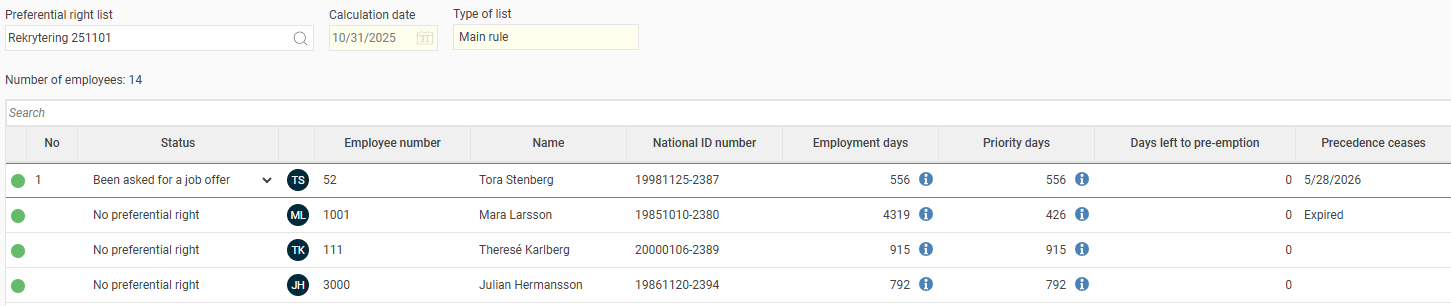
When you've chosen a preferential right list, it shows the employees included. You can sort columns by clicking on the header.
To the left is a column for No, i.e., the precedence order for each employee. This is the order in which you should ask them about new employment.
Color explanation
The coloured balls show whether the employee could be calculated correctly, i.e., it doesn't indicate whether precedence is achieved or not.
|
|
Calculated successfully. |
|
|
Calculated with warnings. For example, there may be periods in the timecard/timesheet that have not been reviewed and therefore cannot be calculated, or the transitional rule may have been applied. More information regarding the specific employment period can be found in the info pop-ups. |
|
|
Not calculated. For example, if any of the employee's employment periods are missing a "from" date. |
|
|
The info pop-up, found in the columns for preferential days and employment days, shows which periods the collected days originate from, as well as whether the calculation is based on calendar days or days worked. |


Info in the list
End of employment cause is directly after "End of employment". This helps you quickly understand why a person is included in the list. For example, you can easily see if someone with relevant historical data has completed their latest employment on their own initiative and therefore doesn't have a preferential right, making the list easier to interpret.
Employment days shows LAS-qualifying employment days. Click the information icon to see calculation details.
Priority days shows the employment days that qualify for preferential right.
Days left to pre-emption shows how many employment days remain until the employee has achieved preferential right. If the list shows 0, the employee has already achieved preferential right. Note that this relates to the column Precedence ceases.
Precedence ceases shows if/when the employee's preferential right has expired/expiring. If the employee has an active fixed-term employment, nothing is shown in this field.
Status
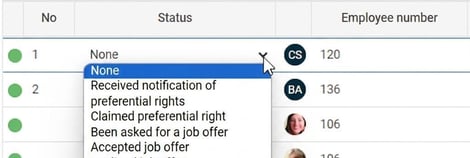
The column Status is used to track the status of each employee on the list. You can edit the status for employees who have achieved preferential right. For employees who have not yet qualified or whose right has expired, status is fixed to No preferential right.
Status is saved per employment period and can be edited either from a list in which the employee participates:
or from the employee's LAS folder in the employee register:
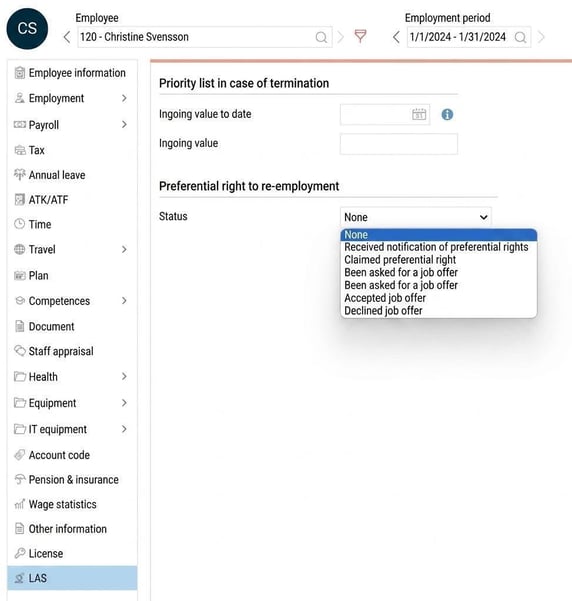
The status is fetched directly from the employment period and is therefore live. It does not require the list to be recalculated. If the status changes, it applies to all lists where the employment is included, provided the same valid period applies for the calculation date.
Note that the status for employment periods that are not qualifying for preferential right is not shown in either the employee register’s LAS folder or the preferential right list. In the list, you will always see the status for the latest employment period that was qualifying for preferential right.
Employees
The list includes employees who:
- have qualified for preferential right
- have not yet qualified for preferential right
- preferential right has expired for
Requirements for an employee to be included in the list are that the employee:
- is part of the selection used when creating the new list
- has at least one employment period that is fully audited in the new employment view
(only audited employment periods are calculated) - has employment type Employee
- does not have an active Permanent employment or Probationary period
- has an employment period that:
- has a form of employment of the type Permanent employment and the end of employment cause is Redundancy due to shortage of work or Redundancy due to bankruptcy
-
- has an ongoing/completed fixed-term employment contract where the end of employment cause is not Own request.
- to be included in a SÄVA list
- must have worked at least one SÄVA period within 3 years from the calculation date
- to be included in a Season list
- must have worked at least one season period within 2 years from the calculation date
Requirements for employees to have qualified for preferential right:
- according to The main rule has been employed
- within nine months from the calculation date and
- has had a period of employment totalling 12 months (30x12 = 360 days) within 3 years from the calculation date.
- according to Preference to new SÄVA has been employed in SÄVA
- within nine months from the calculation date and
- has had a period of employment in SÄVA totalling nine months (30x9 = 270 days) within 3 years from the calculation date.
- according to Preference for new seasonal employment has been seasonally employed
- within nine months from the calculation date (when the new season starts) and
- has had a period of employment totalling six months (30x6 = 180 days) within 2 years from the calculation date.
Other icons

Filter
You can choose not to show all employees on the list by setting a filter. The filter looks at values saved in the respective list, i.e., not the value from the employee register.
Export
You can export the current list as a .csv or .xlxs file at any time.
Recalculate
Recalculates the entire preferential right list. Useful when you have made changes to employments that should be taken into account.
Please note: This article is AI-translated. This means that linguistic errors or misunderstandings may occur.