
When someone with the Form of Employment Special fixed-term employment (SÄVA) has been employed in their SÄVA for more than 12 months within a five-year period, the employment is converted to a permanent employment.
For temporary positions, someone who has been employed as a temporary replacement for more than two years in total within a five-year period is affected.
Discrepancies may exist for when a SÄVA or a temporary position is converted to a permanent employment according to your collective agreement. This article is based on the standard rules according to Law (1982:80) on employment protection.
Create a list for permanent employment
HRM has its own view under Personnel > LAS > Right to permanent employment, where calculations are shown for those approaching or having reached the point when their fixed-term employment will be converted into a permanent employment.
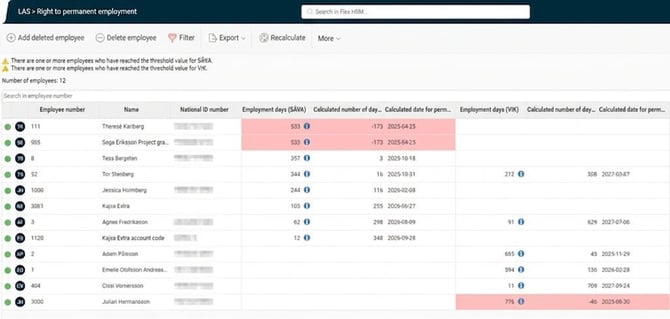
This list is live and therefore does not need to be created in the same way as other LAS lists.
Employees
The list shows active and terminated employments as of the calculation date that have or have had a form of employment counted as SÄVA or temporary position within the past five years. The list does not include current permanent employments as of the calculation date.
The list is permission-controlled, meaning you see the employees you are authorised to view according to the settings for your user.
Delete employee from the list
If you wish to hide an employee from the list, e.g. in the event of someone passing away, select Delete employee in the menu, mark the relevant employee, write a comment about why (optional) and then click Save.
If you want to restore the employee to the list, select instead Add deleted employee in the menu.
What you do here is logged in the list's log under More.
Calculated number of days left
The columns for Calculated number of days left until permanent employment (SÄVA/Temporary position) count each calendar day forward from today, giving the earliest possible date for permanent employment.
Information about calculated days
To see what the SÄVA days or temporary position days have been calculated from, you can click on the info bubbles in the respective columns.
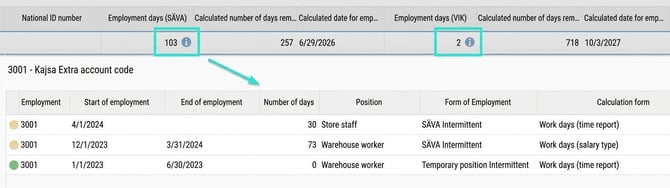
You can also click on rows with days listed or that have a yellow/red status indicator in the first column.
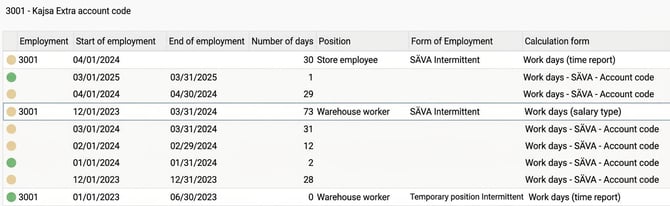
This gives you more information if a period has been adjusted or the calculation has been affected in another way. For example, you may see information about a period overlapping with another, or, as in the example below, where the employee has had three or more occasions in the same month:

Other icons
Filter
You can choose not to show all employees in the list by setting a filter.
Export
You can export the current list to Excel as .csv or .xlsx at any time. The export is permission-controlled in the same way as the list.
Log
The log shows the following events:
- created
- deleted employee
- added employee
- point in time
- who made the change
- which employee it concerns
- comment
Note that the log is not permission-controlled per employee as the rest of the list is. This means that if you have access to the log, you can see the above events for all employees. There is a separate authorisation to view the log; see the authorisations heading above.
Updating the list / Recalculate
If more than 24 hours have passed since the list was updated, a warning message will appear and you can recalculate the list yourself via Recalculate. This may be useful if you know you have made an adjustment to an employee that you want to see immediately in the list.
When you recalculate, the whole list is recalculated regardless of your authorisation, i.e. you recalculate for all employees, even if you do not have permission to view them in the list.
Please note: This article is AI-translated. This means that linguistic errors or misunderstandings may occur.