
There is a log in the time report where you can view information about today's time clockings. It is located in the Day view, under More > Log.
In the image below, you can see that the employee clocked in at 14:21 and was prompted to specify a reason for absence, but did not respond, which interrupted the clock-in. At 14:34, the employee clocked in again and answered the question. Absence has been recorded and clock-in completed.
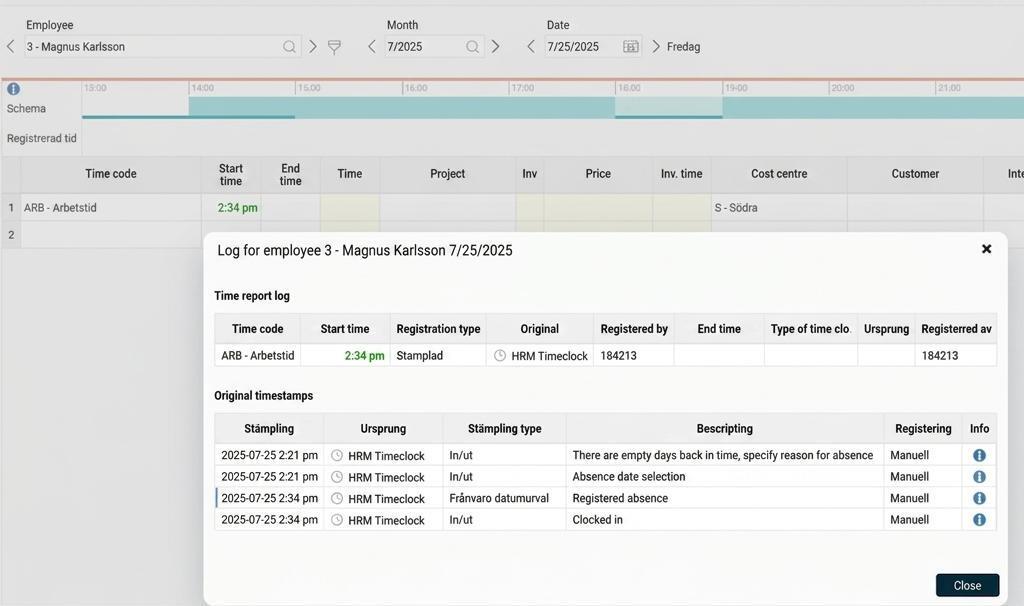
Under System register > Time clock there is the button Show log which provides a more detailed log for clockings made in HRM Timeclock. The log is primarily intended for troubleshooting purposes and to allow you to see what has happened on the various time clocks. In the filter, you can search by time interval, company and time clock and display the log posts that match your criteria.
Please note: This article is AI-translated. This means that linguistic errors or misunderstandings may occur.