
You can recalculate preliminary and audited travel expense claims so that your new settings are applied to previously recorded entries.
If you want to update individual preliminary trips or expenses, you can open each entry and resave it. The entry will then be recalculated based on the new conditions.
If you want to update several travel expense claims at once, it’s easier to use the recalculation function. This is also the only way to recalculate audited travel expense claims without having to remove the audit. However, this does not apply to partially approved lines, as such lines are never recalculated.
Note
You cannot recalculate travel expense claims that have been transferred to payroll.
How to recalculate travel expense claims
- Go to Actions processed > Service routines > Recalculation of travel expense claims.
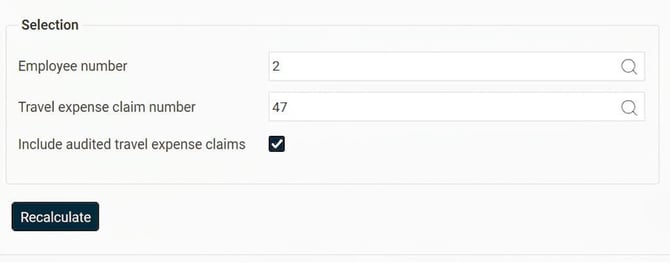
- Make your selection for employee number and travel expense claim number. If you do not make a selection, all travel expense claims will be recalculated for all employees you are authorised to recalculate for.
- Tick Include audited travel expense claims if you also want to update these.
- Click on Recalculate.
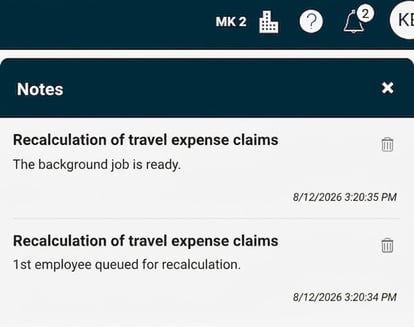
- You will now receive a warning that large recalculations put a load on the server. If you intend to perform a very large recalculation, it is advisable to do so at a time when fewer people are using the system. Once you choose to proceed, the recalculation starts. It runs as a background job, and you will receive a notification when it is completed.
Authorisation
You can only recalculate travel expense claims for employees where you have authorisation for the function Recalculation of travel expense claims.
Log
In the travel expense claim, under More > Log, you can see that the travel expense claim has been recalculated, who did it and when it was done.

What happens when you recalculate?
To recalculate a travel expense claim is essentially the same as resaving the entries in it. Manually entered values are never overwritten, but generated prices and account codes are generated again.
The following will be updated:
- The travel expense claim’s main account codes.
- Account codes and prices which are generated from pay codes and expense codes.
- Increment for car trip (this is recalculated based on increment settings and pay code prices).
- Calculation rules and discrepancies (rules governing subsistence allowance, travel day, travelling time, mileage claim and registration rules).
- Pay codes, if these have been changed in the registers for, for example, expense codes or vehicle types.
The following is not changed:
- Manually entered values and account codes .
- Prices for expenses linked to credit card.
- Values from receipt scanning.
Example: Expense code Extra allowance is linked to a pay code that gives an allowance of SEK 15. Employee 2 has recorded a travel expense claim with two rows for this expense code. One row has the SEK 15 generated from the pay code, whilst the other row was manually changed to SEK 30.
You change the pay code so that it has a new price of SEK 20 and then recalculate the travel expense claim. The item that had the generated price from the pay code is now updated to SEK 20, while the manually changed one remains at SEK 30.

Rules for recalculation of price and VAT
For a price to be recalculated, total amount, unit price and VAT must have been calculated in the system. This means that the values must not have been entered manually, or alternatively that both the total amount and unit price are empty.
When a price is updated, the system retrieves information in the following sequence:
- First, a manual price which is set on the pay code in the expense settings is retrieved.
- Second, the price is retrieved directly from the pay code.
If the criteria for calculating VAT are met, the VAT will also be calculated when the price is updated. Simply changing the VAT rate on the expense code does not cause VAT to be recalculated. However, if another change causes VAT to be recalculated, the current VAT rate will be retrieved.
Difference between recalculating and resaving an expense
When you perform a recalculation, the system always fetches the price from the pay code again and updates it if the price has changed.
For travel and car trips, the price from the pay code is recalculated even when you resave the entry manually. For expenses, this price update only occurs when you use the recalculation function.
Entries that are not recalculated
Connected codes (sub-expenses)
Connected codes are not recalculated in the same way as standard expenses:
- During a recalculation, it is the main expense that is recalculated.
- The sub-expense only gets a new price from the main expense if the code is set to inherit the price.
- If the code is not set to inherit the price, the sub-expense price is not recalculated, even if the code has a new price in the expense or pay code register.
Entries that have been released to invoicing
Entries that have been released to invoicing are not recalculated. The entire row is skipped, not just the invoicing information.
If a release has not been made and there are no manual changes in the invoicing information, this will be affected by the recalculation. If there are manual changes in the invoicing information, this part is not recalculated.
Partially approved lines
Entries that have been partially approved are not recalculated, even if you tick to recalculate audited travel expense claims.
Note:
Here, we use the term partial approval for audit that is done per row. It may be called something else in your system.
Transfer to accounting (Fortnox)
Travel expense claims that have been transferred via the function Transfer to accounting (Fortnox) will not be recalculated.
Please note: This article is AI-translated. This means that linguistic errors or misunderstandings may occur.