
With the translation function, you can customise texts in the system. For example, you can translate audit levels, roles, countries and currencies.ersätta granskningsnivåer, roller, länder och valutor.
Please note! This function is only displayed if you have the Language add-on module in your program version.
Translate system texts
Go to System register > Translation. Here you translate general system functions.
Keep in mind that this is a system register and that the translation under this setting applies to All companies in your installation.
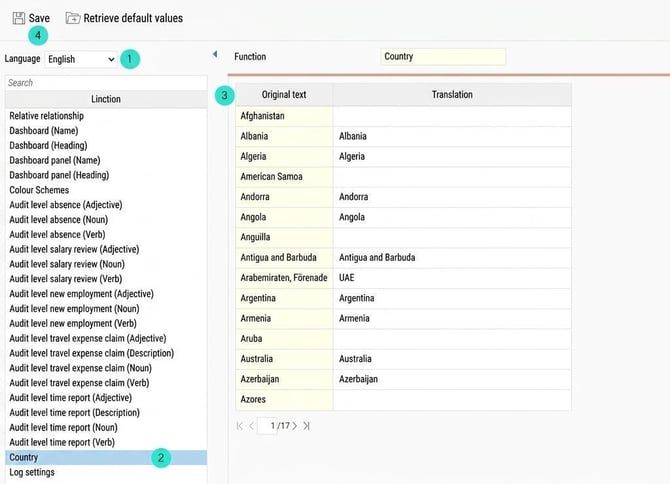
Here, you see the following view:
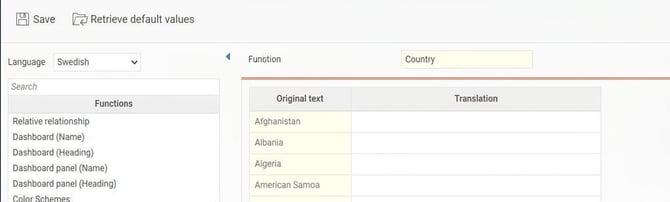
Make your translation
- Language - First choose which language you want to translate to.
- Function- Here you select which function you want to translate at the moment.
- Original text - Select the text you want to translate. This text will then be shown under Translation , where you make the actual translation.
Translation - Here you enter the requested translat ion of the highlighted text in the column Original text. - Save.
Translation for a specific company
To translate parts in a specific company, go to Settings > General > Translation
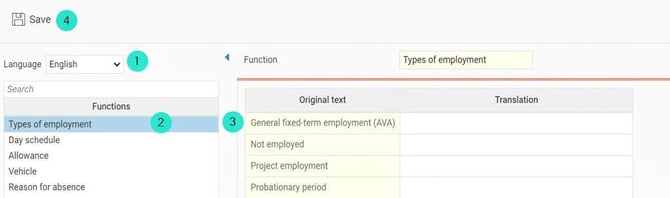
Here you see the following view:
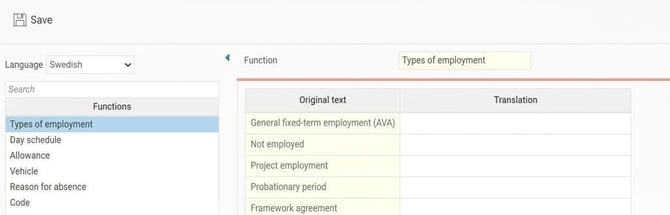
Make your translation
- Language - First, choose which language you want to translate to.
- Function - Here you select which function you want to translate at the moment.
- Original text - Select the text you want to translate. This text will then be shown under
Translation , where you make the actual translation.
Translation - Here you enter the requested translation of the highlighted text in the column Original text. - Save.
What can I translate myself?
System-wide
-
Relative relationship
-
Dashboard (Name and heading)
-
Dashboard panel (Name and heading)
-
Color Schemes
-
Audit level absence
-
Audit level salary review
-
Audit level new employment
-
Audit level travel expense claim
-
Audit level time report
-
Country
-
Log settings
-
News category
-
Roles (Description and name)
-
Currency
Per company
-
Types of employment
-
Day schedule
-
Allowance
-
Vehicle
-
Reason for absence
-
Code
-
Competences
-
Competence group
-
Account code dimension
-
Meals
-
Accommodation (Name and headline for comment)
-
Pay code
-
Unsocial working hours Day type
-
Personnel categories
-
Public schedule
-
Break rule
-
Registration rule
-
Balance
-
Time groups
-
Time code
-
Set of subsistence allowance
-
Expenses
-
Overtime marking
Please note: This article is AI-translated. This means that linguistic errors or misunderstandings may occur.