
Reminders
In HRM, you can create customised reminders for various events such as absence, reviews and deadlines.
Different reminders can be customised and used in various ways. In the screenshot below, you see the reminder for an application for absence, where you can select the reason for absence and at which absence status the reminder should be sent. You can also select employees based on home account code and time group.
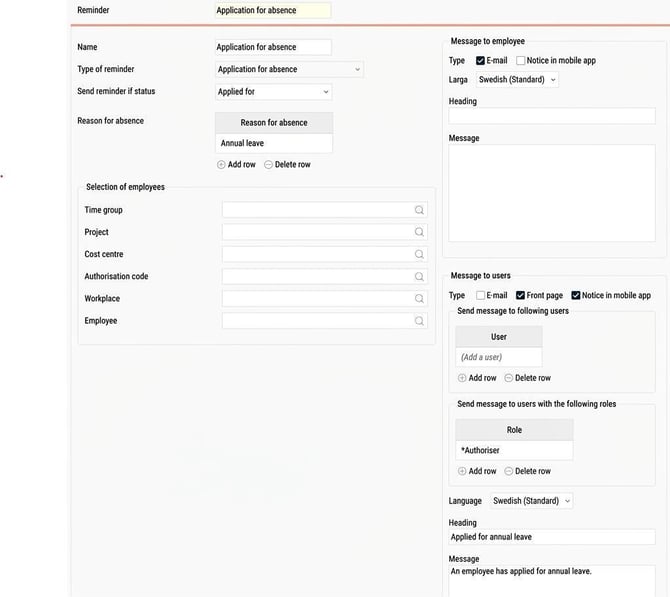
Choose whether the message should be sent to the employee, user, or users with a specific role. Message to employee can, for example, be used as a reminder to finalise the time report. Employee in this context means the message will be sent to the user connected to the employee for whom the time report concerns.
Specify how the reminder should be sent. This can be by email, note in the mobile app and/or on the HRM front page.
For emails and notes, you need to specify a heading and message. If you use HRM in different languages, you can enter heading and message for each language. The recipient's language setting in HRM will determine the language of the reminder (for notes in the Flex HRM app: the language setting on the user's mobile device).
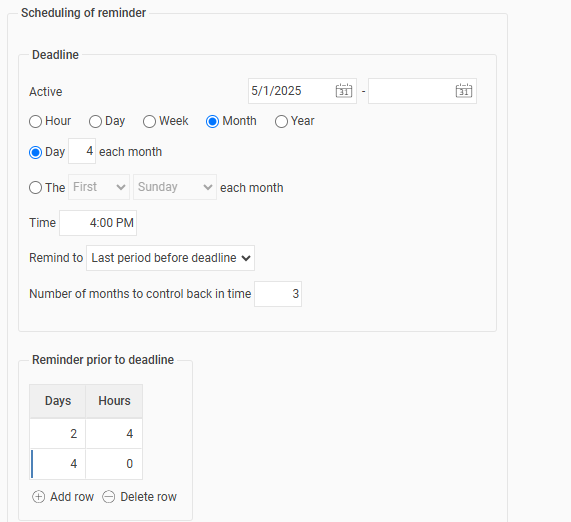
Some reminders use a setting for deadline, for example, that time reports must be finalised no later than day 4 of each month at 12:00. Reminders are not sent at the deadline, but at the time set under Reminder prior to deadline.
If you choose to set reminders prior to deadline as below, Days 1 and Hours 4, the reminder will be sent 1 day and 4 hours before the deadline, that is, on day 3 at 08:00.
Note in mobile app
A note in the mobile app means the user receives a notification from HRM Mobile.
In our new Flex HRM mobile app notifications are shown for the functions that have been built. Currently, this applies to the notification for finalising the time report. In our new app you can, among other things, clock, scan receipts and get help from the AI assistant Flexie. Read more here: What is the Flex HRM app and why are there two apps?
Please note: This article is AI-translated. This means that linguistic errors or misunderstandings may occur.