
Working time pension & Lifetime working time pension
This applies to those with a collective agreement where employees can choose to allocate their earnings to extra pension, and who have pension via Fora. To facilitate reporting to Fora for all employees who have chosen extra pension provision, it is possible to create a file for reporting. This applies to employees in the Fora category Employees.
Create file
When the employee has made their selection for ATK / ATF and you have run the routine to process the choice and start a new withdrawal period, the system generates a payroll transaction with the amount to be set aside for pension in the preliminary payroll run (as a passive pay code). Once this is done, you can create a file for extra premium to Fora by clicking the button in the ATK / ATF turn of the year view.

Here you then select a Payment date for which the amount for the pension premium should be totalled.
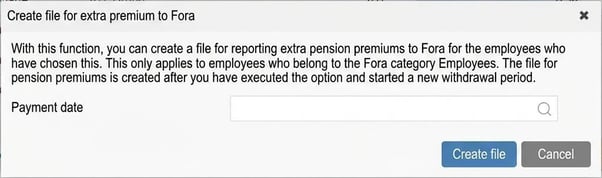
When you click on Create file the system compiles a file containing all those with the Fora category Employees. The file is downloaded directly in the browser and is not saved in the system.
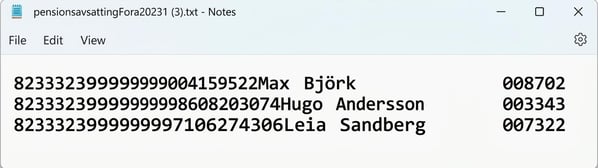
The file generated is a text file according to Fora's format for extra premiums and may look like this:
Settings
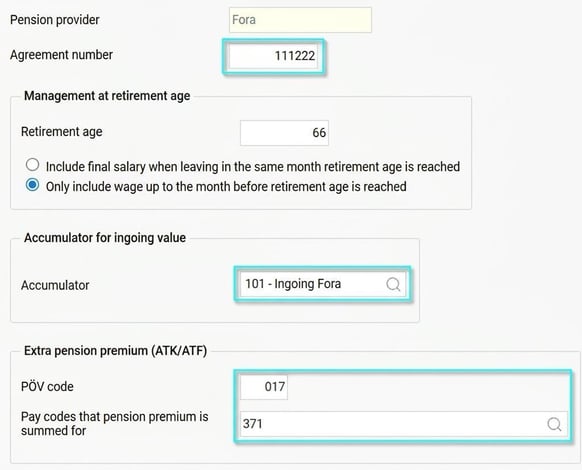
To create a file for Fora, these settings are required under Administration - Settings - Payroll - Pension and insurance.
- Agreement number for Fora
- PÖV code
If you have a PÖV code, you need to specify it here. PÖV code is the code for pension agreement. - Pay codes to be totalled for pension premiums
Here you specify the pay codes you use for pension premiums. You must enter at least one pay code, but you can select several. This is useful if, according to the agreement, you are to allocate an extra premium when choosing allocation to pension.
Reporting of extra pension premiums
Fora is introducing new routines for reporting extra pension premiums as of 7 April 2026. For reporting from HRM Payroll, an Excel file can be created via the Report generator, provided that the amount to be reported has been placed on a pay code (e.g. a passive pay code for 'bonus - allocation to pension' in a payroll run). The Excel file should have the following appearance:
A. National ID number - 12 characters, no hyphen.
B. First name - maximum 40 characters.
C. Surname - maximum 40 characters.
D. Premium amount - no separators between digits.
The image below shows how to build a report template for this in the report generator. When running the report, a selection is required for the current payroll run and the pay codes whose amounts are to be reported in the file.
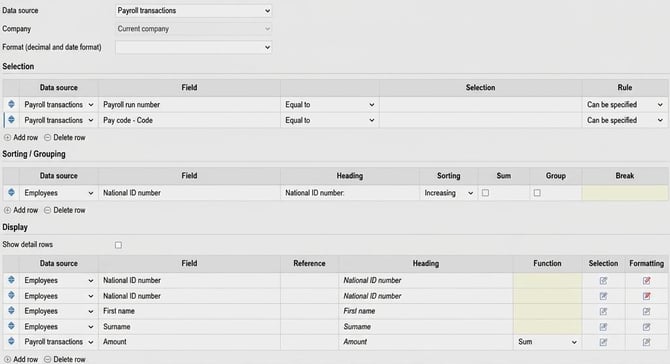
The following additional settings need to be made under the display fields for:
National ID number - row 1. To retrieve the first 8 digits of the National ID number, the following setting is made under Formatting:
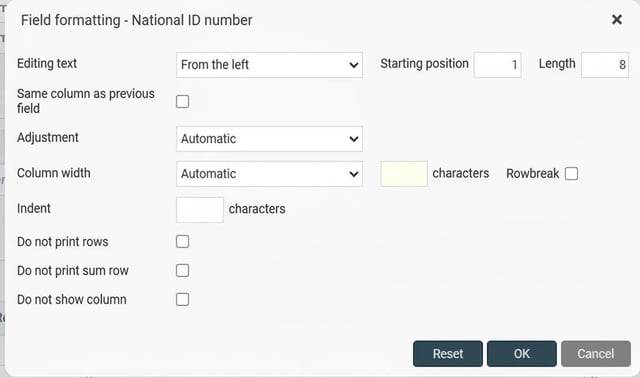
National ID number - row 2. To retrieve the last four digits of the National ID number and merge these with the first 8 (without the hyphen), the following setting is made under Formatting:
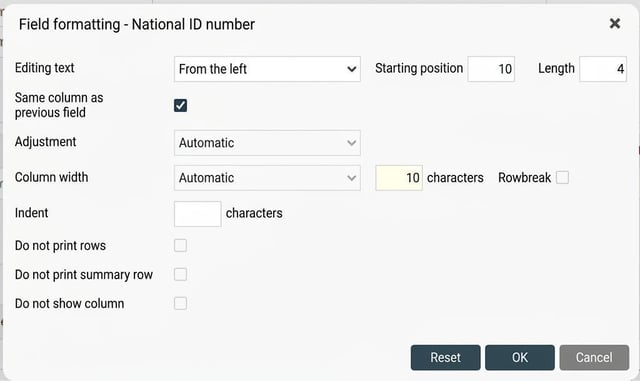
First name - row 3. To ensure a maximum of 40 characters, the following setting is made under Formatting:
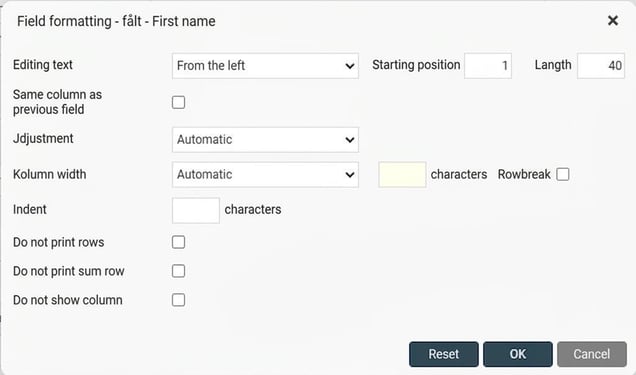
Surname - row 4. To ensure a maximum of 40 characters, the following setting is made under Formatting:
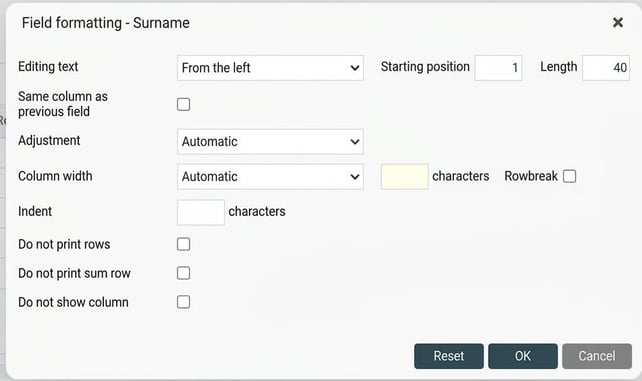
Part-time pension provision
By assigning a marking code to all Employees at the Company, Fora knows who is covered by an additional pension premium. The premium is being calculated based on the payroll reported monthly. No separate marking or reporting is thus required.
Please note: This article is AI-translated. This means that linguistic errors or misunderstandings may occur.