
What you can view/edit is determined by the role.
Which employees you can view/edit (for example, in a report) is determined by where you assign the role to the user. For example, directly under their own name or at company level.
Example of authorisation in reports
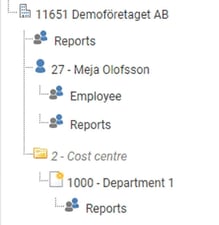
In the examples below, we assume that the role Reports provides access to reporting functionality, while the role Employee does not provide this authorisation. The user Meja should have access to generate reports. Depending on where the role is assigned, she will have the right to see more or fewer employees in the report.
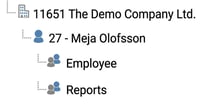
Here the user has the role Reports only under their own name and can therefore only see themselves in the report:
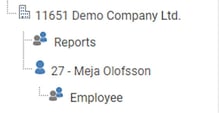
Here the user has the role Reports for the entire company but not under their own name, which means they can see all other employees in the company in the report, but not themselves:
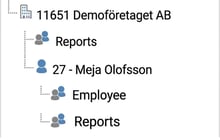
Here the user has the role Reports at both company level and under their own name, which means they can see all employees in the company, including themselves, in the report:
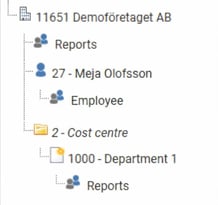
Here the user has the role Reports for both a cost centre and the entire company, but lacks the role under their own name, which means they can see everyone else in the company in the report except themselves, even if they belong to the relevant cost centre:
Here the user has the role Reports for both a cost centre and the entire company as well as under their own name and can therefore see all employees in the company, including themselves, in the report:
You can find your roles under Administration > Users/Authorities > Roles and you can find your users under Administration > Users/Authorities > Users.
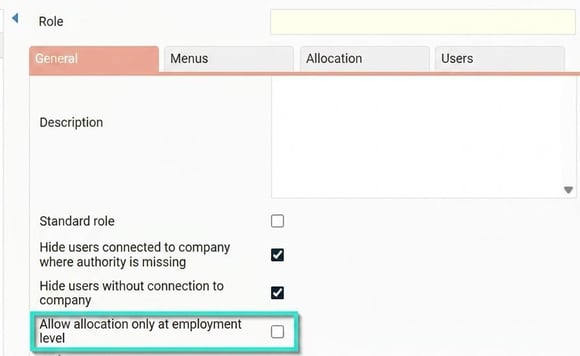
💡If you want a role to be assigned only at the employee level, you can restrict the role so that it can only be set at the individual level. This is done to avoid, for example, employee roles being allocated at company level.
Related
What is a role?
Please note: This article is AI-translated. This means that linguistic errors or misunderstandings may occur.