
Here, we explain how to create and set up balances. If you want more information on how to specify which balances should be displayed in the time report and how they should be shown, we recommend this article: How do you set up the display of balances in the time report and time terminals?
Define balances
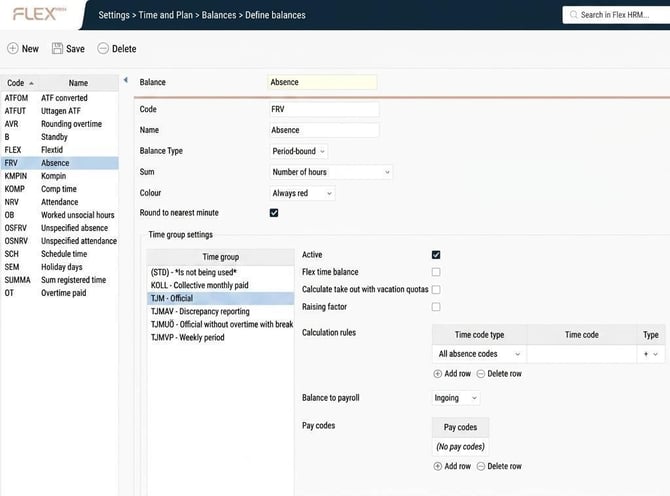
Under Define balances you create balances and set the following settings:
- Code
- Name
- Balance Type - Period-bound means that the balance does not carry over into a new period (often a month, but you can have a weekly period, or work with a broken period, so that a new period starts, for example, on the 16th of each month).
Rolling means that the balance carries over into a new period. - Sum - A balance can sum number of hours, number of days or number of days calculated against schedule time.
Example: A balance sums the time code KMPIN. Schedule time for a day is 8 hours. 4 hours of KMPIN are registered.
A balance that sums number of days shows a balance of 1.
A balance that sums number of days calculated against schedule time shows a balance of 0.50. - Colour
- Round to nearest minute - Balances are displayed by default as decimals. Half an hour is shown as 0.50. 5 minutes is shown as 0.08.
It is often desirable to display balances in whole minutes, but you may have balances that sum something other than time, and calculations from Events where you want to see the exact value. If you tick Round to nearest minute the balance will never show values such as 0.09, as this doesn't represent a whole minute (5 min is 0.08, 6 min is 0.10). - Time group settings
- Active
- Flex time balance - If you tick Flex time balance you do not need to set any calculation rules. The balance will show the difference between scheduled time and registered flex time-qualifying time.
- Calculate take out with vacation quota - Balances that sum number of days can be set to calculate withdrawal with vacation quota.
Example:
Employees who work 4 days a week have a vacation quota of 1.25. If you take a week’s annual leave, five days are deducted from the balance, even if you are only off work for four working days. - Raising factor - Time codes can have a factor, often 1.5 for simple compensation and 2.0 for qualified compensation. If Raising factor is ticked, the balance includes the time code’s factor, otherwise not.
- Calculation rules - Specify which time code types/time codes should affect the balance, and whether they should give a positive or negative value.
- Balance to payroll - If the balance is transferred to payroll, it can be the period's ingoing value, the period's outgoing value, or the period's balance value.
- Pay codes - If you specify a pay code here, the balance will be transferred to payroll. If no pay code is specified, it won't be transferred.
Note
It is common to transfer the time codes that affect the balance to payroll, and then not to transfer the balance itself.
Please note: This article is AI-translated. This means that linguistic errors or misunderstandings may occur.