
Login to Flex HRM and HRM Mobile is done via Visma Connect. For a user to be able to log in, they must be connected to Visma Connect with an email address.
How the Visma Connect account is created at new employment
When is the verification email sent?
|
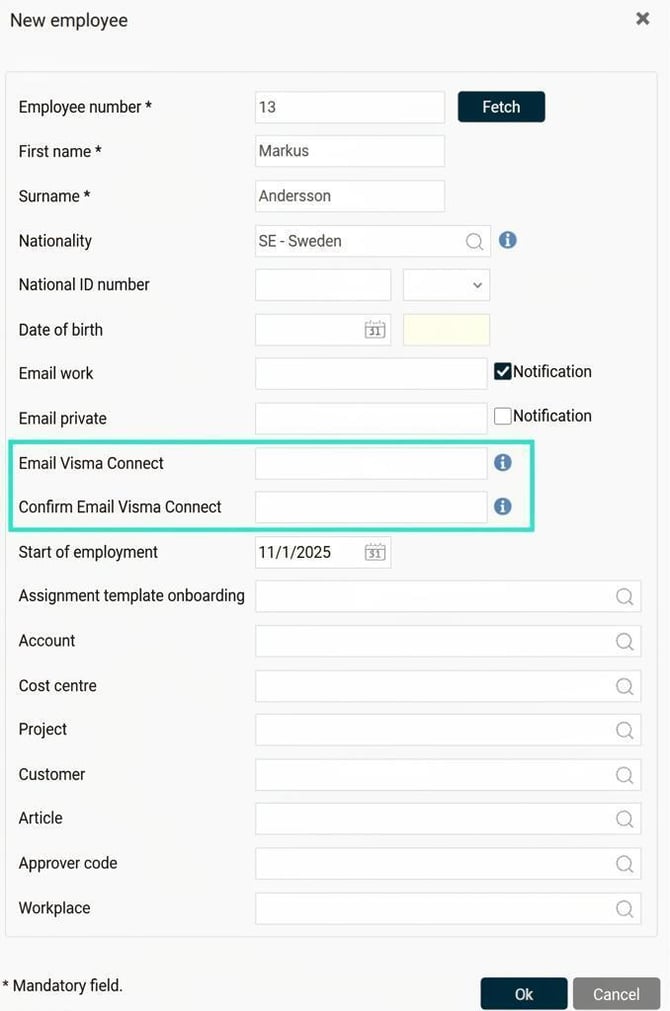
When hiring a new employee, you can use an employment template linked to a user template. This automatically creates a user. You can do this during manual registration, import, or via API. If you use templates, you can enter the email address for the Visma Connect link as soon as you add the new employee. Don't see the field? Enable the field "Email Visma Connect" under Settings > General > Audit levels > New employments.
|
|
|
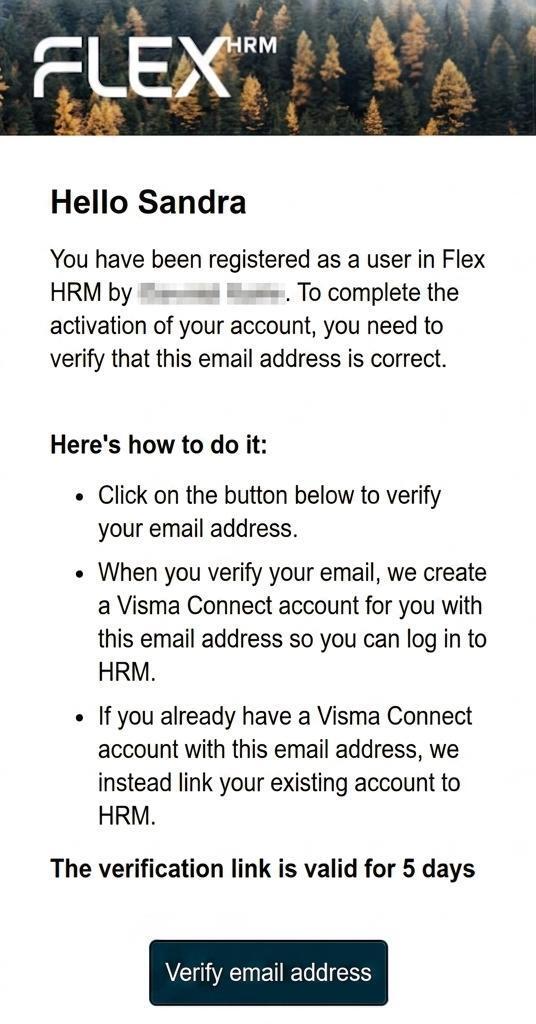
You don't need to do anything else to link the new user to Visma Connect:
|
|
The system manages the mailing according to the employment's start date:
-
Start date tomorrow or earlier: The invitation is sent directly when you save the employment.
-
Start date the day after tomorrow or later: The invitation is sent at 09:00 the day before the first day of employment.
-
When using review flow in the new employment view (requires a licence for HRM Employee): The invitation will only be sent once the employment has been finally approved in the flow.
If a future employment is audited, the invitation is sent at 09:00 the day before the first day of employment, even for employments that have been audited.
If an employment with a start date tomorrow or earlier is audited, the invitation is sent at the final audit step.
The newly hired employee has plenty of time to verify the account. The link in the invitation is valid for a total of five days, counted from the day it is sent. By verifying the account, the new employee creates their login to Flex HRM. Visma Connect is the service that manages this secure login process.
If you have a verified domain
If you have a verified domain (General > Security) the Visma Connect account is automatically created when you specify an email address belonging to the domain (and any audit of the employment has been performed). In this case not any verification email is sent to the user. The Visma Connect account is then created upon registration/audit of a new employee, regardless of the employment's start date.
What happens for those already using Visma Connect?
Flex HRM will be linked to an existing Visma Connect account if the email address is already connected to one. Verification is carried out from Flex HRM as usual, but instead of creating a new account, it is linked to the existing Visma Connect account.
Please note: This article is AI-translated. This means that linguistic errors or misunderstandings may occur.