
Time clocking
Settings
When clocking in using HRM Mobile, you can get assistance to clock on the correct account code, based on your current location. By specifying positions for, for example, various projects, HRM Mobile can then automatically select the right project when you clock in/change account code.
Please note
Here, we use the term project, but it could just as well be cost centre, customer, assignment, or another account code.
Time clocking
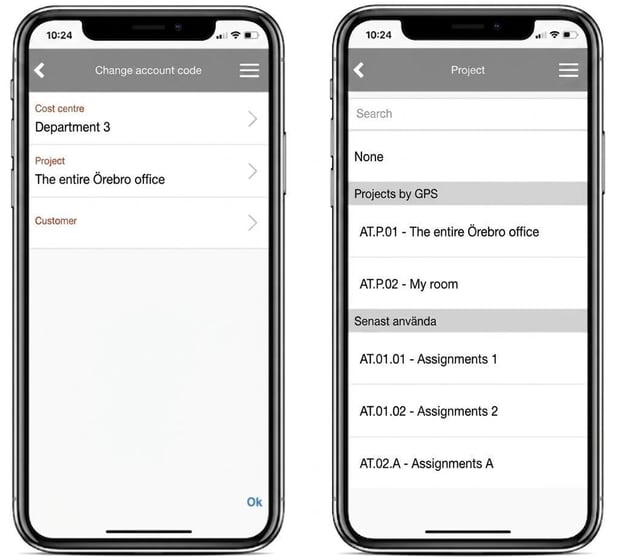
When you clock in/change account code in HRM Mobile and your current location matches a project, that project will automatically be selected. If your current position matches several projects, these will be shown as proposals when you choose a project (image to the right below).
Settings
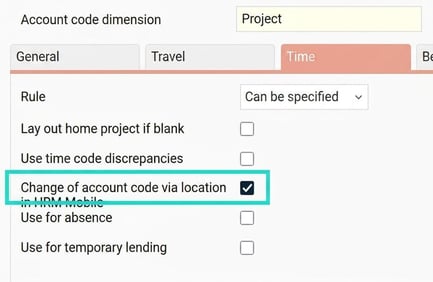
The function is activated per account code dimension under Settings > General > Account code dimensions > Time tab: Change of account code via location in HRM Mobile.
You select which employees should be affected by this function by ticking the setting Propose account codes via location in HRM Mobile, either for the entire company (Settings > Time and Plan > Time reports), for one or more time groups (Settings > Time and Plan > Time groups) or for specific employees (Employees > Time).

You then specify one or more positions for the various projects, Register > Project. A position is specified either by selecting an already registered position (under Settings > Time and Plan > Positions) or by marking a position on the map. There is also the option to import positions into the account code register.
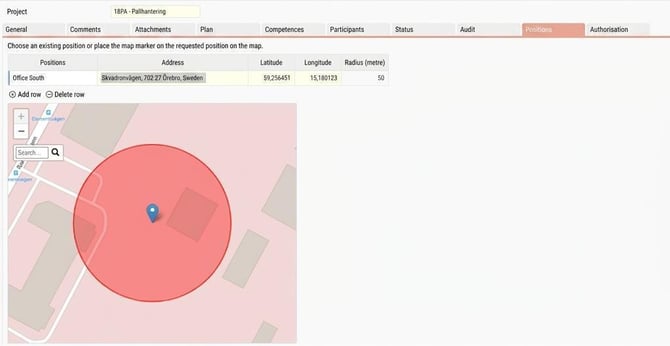
You can specify how many metres radius should be accepted to determine if an employee is at the position. If no radius is chosen, a default value is used. You can set the default value under Settings > Time and Plan > Time reports.

Please note: This article is AI-translated. This means that linguistic errors or misunderstandings may occur.