
It is possible to use time clock tolerances so that clocked time is rounded off to schedule time, or to the flex frame if you use flex time.
An example of area of use could be when flex time is not being used, but you don't want unspecified time just because an employee has clocked in a few minutes late or early.
Time clock tolerances can be set per day schedule, per time group or at company level (under Time reports). The most specific level applies. If you have set time clock tolerances for all levels (day schedule, time group and company), only the day schedule's time clock tolerance applies.
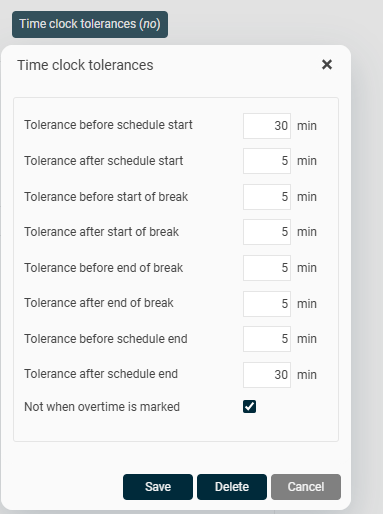
Tolerance before/after
Specify how many minutes before and/or after an event (schedule start, break start, break end, and schedule end) time clocking should be allowed. A time clocking made within the interval will be shown in the time report with the event's time, for example at 08:00 if schedule start is then.
If flex frames are being used, tolerances are adapted accordingly. A schedule with schedule start at 08:00 and flex frame from 07:00 would manage 'Tolerance before schedule start' as the time before 07:00.
Not when overtime is marked
Tick here if the time clockings should not be changed if the employee has made an overtime marking.
Example
We use the time clock tolerances shown in the image above, 30 minutes before schedule start.
A day schedule has working time from 08:30, no flex frames.
1: Employee 1 clocks in at 07:00. The time in the time report becomes 07:00, as the time clock tolerance hasn’t started to apply yet.
2: Employee 1 clocks in at 08:19. The time is rounded off to 08:30.
Tip
Hover over the time in the time report to see the actual clocked time. You can also view the actual clocked time under More > Log. 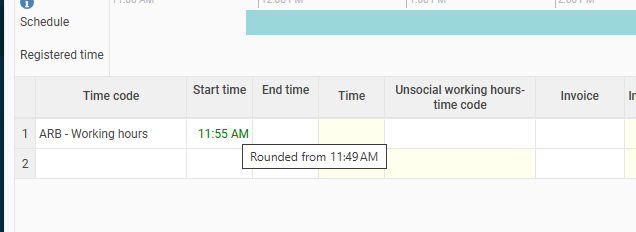
Note
This is a time clocking tolerance. Only clocked times can be rounded off. Manually entered times apply, even if they fall within the time clocking tolerance interval.
Please note: This article is AI-translated. This means that linguistic errors or misunderstandings may occur.