
Settings in the Time Code Rounding view
Examples with outcome in time report
Time code rounding is used to round off registration of certain time codes.
It is often about overtime which should be rounded off to full half hours. The rules for time code rounding determine how the rounding is done and whether time that is rounded away/added should be added to/taken from another time code.
Time code rounding never appears on the time rows in the time report. Time code rounding is shown in balances and in the transfer to payroll.
Settings in the Time Code Rounding view
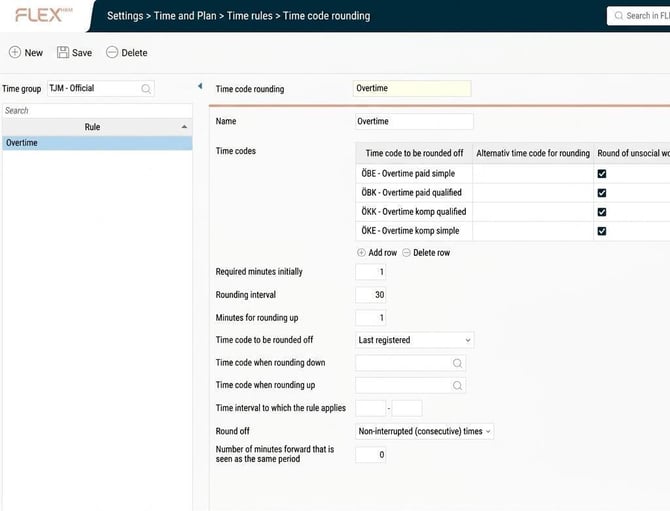
Time code to be rounded off
Here you can specify a time code to be rounded off, or several time codes if they are to be rounded together.
Example:
Overtime should be rounded up to the nearest half hour.
Alternative 1: I make a separate setting for time code rounding for time code ÖB1, and a separate setting for time code rounding for time code ÖB2.
I register 15 minutes ÖB1 and 15 minutes ÖB2.
Result: 30 minutes ÖB1 and 30 minutes ÖB2.
Alternative 2: I make just one setting for time code rounding where both ÖB1 and ÖB2 are included.
I register 15 minutes ÖB1 and 15 minutes ÖB2.
Result: No rounding as ÖB1 + ÖB2 becomes 30 minutes, which is not to be rounded.
Alternative time code for rounding
Useful if the rounded part should be separated from the actual worked time to avoid mixing up what has been worked and what is a pure allowance.
Round of unsocial working hours
Time code rounding is actually a time row rounding, which means that unsocial working hours can be rounded off even if the rule is really applied to the time row's main time code.
Required minutes initially
The number of minutes you must register at a minimum for time to be paid out.
Rounding interval
The number of minutes to which the time should be rounded off (e.g. 30 if it should be full half hours, regardless of whether rounding is up or down).
Minutes for rounding up
Here you decide if rounding is upwards or downwards. If each started half hour should be counted as a half hour you specify 1 minute. If only fully worked half hours should be counted you specify 30.
Example:
1: In the image below the required minutes initially is set to 1, rounding interval 30 and minutes for rounding up 1. This means that already the first registered minute is rounded up to 30 minutes. Each started half hour is rounded up to the next half hour.
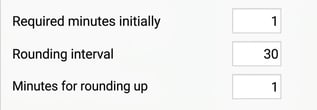
2: In the image below the required minutes initially is set to 30, rounding interval 30 and minutes for rounding up 1. This means you must have worked 30 minutes to get overtime. All time over the initial 30 minutes is rounded up to the nearest half hour.
If you work 31 minutes overtime it will be rounded up to 1 hour.
If you work 29 minutes overtime it will be rounded away.
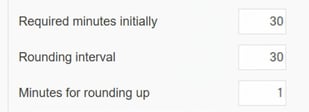
3: In the image below the required minutes initially is set to 1, rounding interval 30 and minutes for rounding up 30. This means you round away what is not an even half hour.
If you work 35 minutes it is rounded to 30 minutes.
If you work 20 minutes it is rounded away.
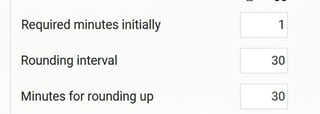
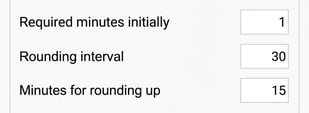
4: In the image below the required minutes initially is set to 1, rounding interval 30 and minutes for rounding up 15. This means you must work 15 minutes for the time to be rounded up to the nearest half hour.
If you work 44 minutes it is rounded to 30 minutes.
If you work 45 minutes it is rounded to 1 hour.
Time code to be rounded off
Used if several time codes are rounded in the same rule.
With most time means that the rounding will be added to/subtracted from the time code with the most time before rounding.
Last registered means that the rounding will be added to/subtracted from the time code that has the last time row of the day in the time report.
Example:
I have registered 15 minutes on time code ÖB1 and 1 hour on time code ÖB2. Overtime is set to be rounded up to the nearest half hour. This means I should get another 15 minutes of overtime.
If time code to be rounded off is set to With most time then these 15 minutes will be added to time code ÖB2.
If time code to be rounded off is set to Last registered the 15 minutes will be added to the time code which is last in the time report.
Time code when rounding down
A time code specified here collects the time that is rounded away. For example, if you worked 35 minutes overtime but only 30 counts as overtime and 5 as flex earned.
Time code when rounding up
If you round upwards, for example 15 worked minutes of overtime becomes 30 minutes, the adjustment can be added to a time code.
Time interval to which the rule applies
Specify min and max number of minutes for which the rule should apply. Rarely used, but can be useful if, e.g., the first three hours are rounded in one way and time over three hours in another way.
Round off
Used to specify whether to collect all time codes included in the rounding rule used during the day before rounding, or if you should only round non-interrupted (consecutive) times together.
If you select Consecutive Times, an additional setting is displayed: Number of minutes forward considered the same period. This setting ensures that if a second period of overtime starts within e.g. 3 hours of the start of the first, a completely new 3-hour period is not triggered for payment.
Example:
Overtime is set to be rounded up to the nearest half hour.
I have worked 20 minutes overtime before working hours and 40 minutes after working hours.
Alternative 1: Round off is set to Non-interrupted (consecutive) times. The morning time is rounded to 30 minutes and the afternoon time to 1 hour, so I get a total of 1 hour and 30 minutes overtime.
Alternative 2: Round off is set to The entire day. The overtime is totalled to 1 hour, meaning that rounding does not take place.
Example time code rounding setting and outcome in time report
Example 1
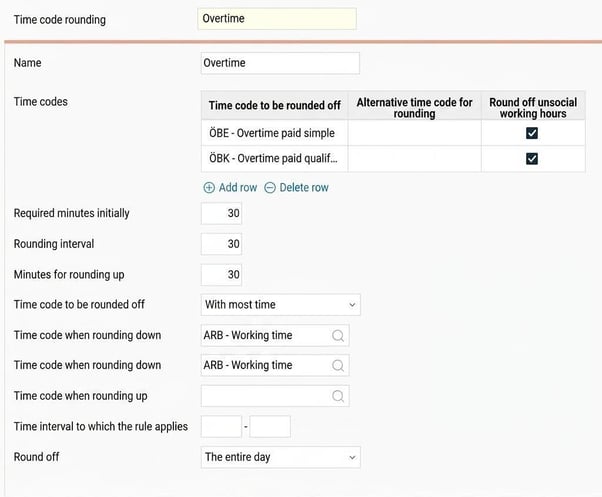
A rule may look as follows. Overtime registered on the time codes ÖBE and ÖBK should together become full half hours. If you register 32 minutes, 30 of these are overtime and 2 minutes are added to the time code ARB, so they are counted as flex earned.
The rule states that you must work 30 minutes to get 30 minutes, so rounding up never takes place.
If you register 28 minutes ÖBE and 4 minutes ÖBK, 2 minutes ÖBE will be rounded away and added as ARB because Time code to be rounded off is set to With most time.
Example 2
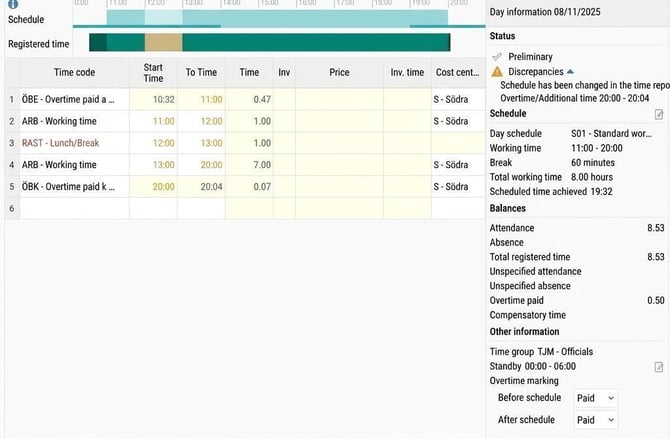
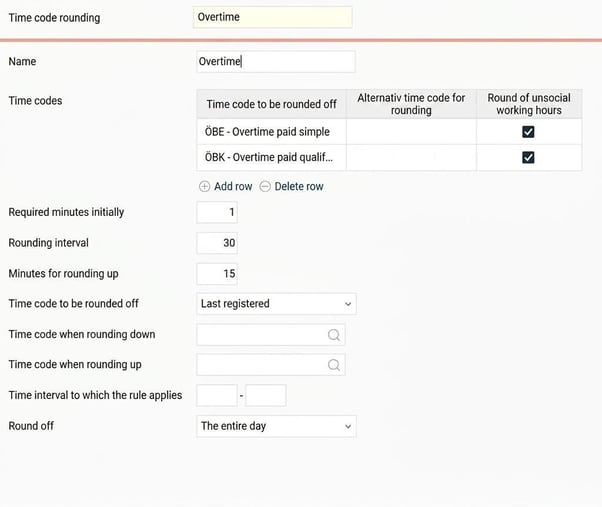
The rule below states that ÖBE and ÖBK should be rounded to full half hours. If you have worked 15 minutes it is rounded up, while minute 1-14 in a started half hour is rounded away.
In the time report, 10 minutes ÖBE are registered before working hours and 40 minutes ÖBK after working hours.
Because the rule rounds consecutive times ÖBE disappears. ÖBK is rounded down to 30 minutes.
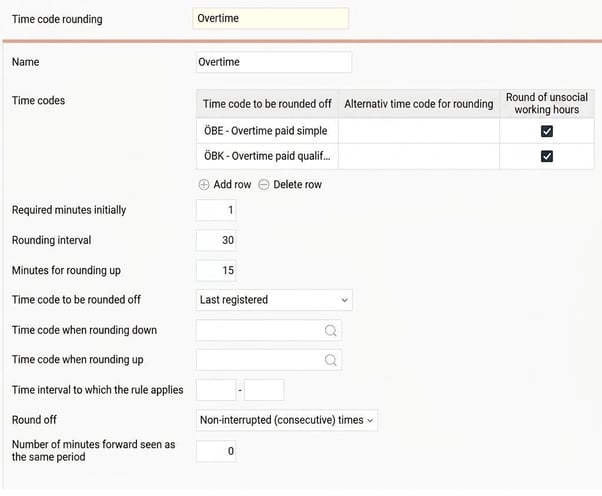
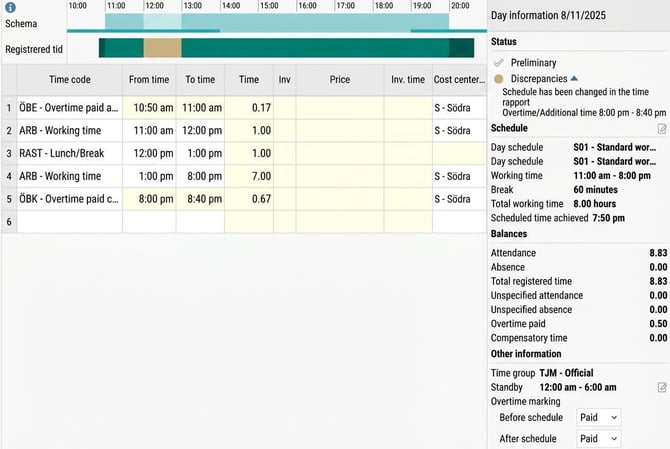
If the rule had been set to round off The entire day the overtime would have been 1 hour because 40 + 10 = 50.
Time code to be rounded off is Last registered, which in this case is ÖBK. This means that ten minutes are added to ÖBK.
Please note: This article is AI-translated. This means that linguistic errors or misunderstandings may occur.