
Expenses or entertainment from credit card transactions
If the employee has a connection to a credit card, there will be a function button for this. Click on More and Credit card to show all imported credit card transactions.
Select the transaction you want to import.
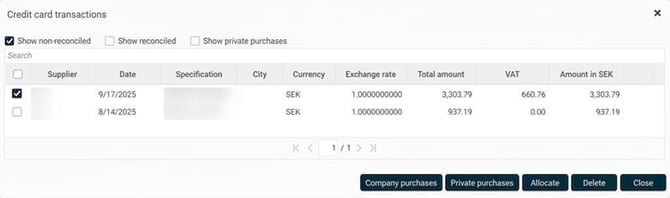
Choose whether the transaction in question is a company purchase or a private purchase. If you choose Private purchase, the transaction is removed from Not reconciled transactions. If you select Company purchase instead, the next step will be to link the transaction to the correct expense type. In some setups where MCC-codes are used, you do not need to choose expense type as the transaction will be linked directly to the correct expense code.
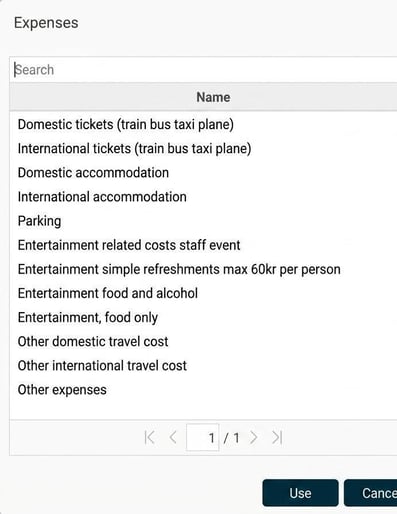
Select the expense code that corresponds to the credit card transaction.
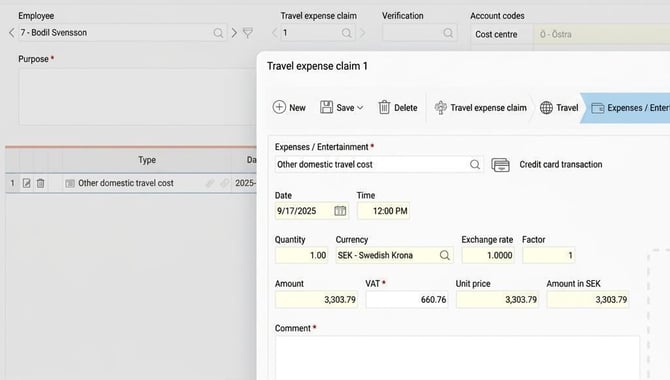
The transaction disappears from the list of not reconciled transactions and is instead added to the travel expense claim.
Allocate a transaction to multiple types
If a transaction contains both private and company costs, the transaction can be allocated. Click the Allocate button and enter how much of the transaction should be allocated to each type. In the example below, where the user has a company-procured private card, the transaction can be divided between the private and company part. (Note that this is not possible with a company card). The system will help you see how much is left to allocate so that no amount is missed.
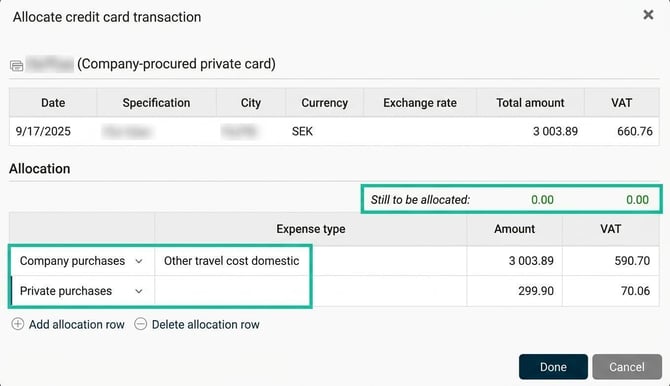
The allocation can also be made against two different expense codes if the entire amount is not of the same cost type.
Remove a reconciled transaction
If a transaction has been incorrectly used in a travel expense claim, it is possible to remove the entire expense. Double-click the transaction in the travel expense claim total to open it in a pop-up, then select Delete. The credit card transaction will then be available again as a not reconciled transaction.
Please note: This article is AI-translated. This means that linguistic errors or misunderstandings may occur.