
A table lock is a function that prevents multiple users from working on the same item simultaneously in Flex HRM. This could involve working with the same employee in a time report or using a specific function, for example, Transfer to payroll. The system ensures that only the first user gains access, while the others receive an error message.
Where can I find table locks?
You can see which functions and rows are locked by various users under General > Table locks.

The following information is displayed in the view:
-
User – The user's login ID.
-
Point in time – When the function was locked.
-
Company – The company the user is working in.
-
Function – Which function the user is working with.
-
Row description – The row in a table being referred to.
Can I remove a table lock?
If your work is blocked because of a table lock, you have the option to delete it. You can see who has locked the function under General > Table locks. Talk to that user to see if the lock is necessary.
Note
If you delete a lock, it may cause the other user to lose unsaved changes.
In the table lock view, there are three function buttons:
-
Update – Refreshes the list with the latest changes.
-
Delete all – Deletes all locks.
-
Delete selected table lock – Deletes a specific lock that you have selected.
Can old table locks be removed automatically?
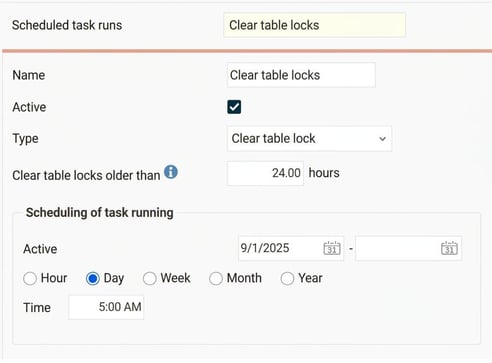
Yes, to avoid unnecessary locks, you can set up regular cleaning. Under General > Scheduled task runs you can configure an automatic run that, for example, deletes locks older than 24 hours. In the example below, the cleanup is to be carried out daily at 05:00.
Please note: This article is AI-translated. This means that linguistic errors or misunderstandings may occur.