
How do anniversary dates work?
You can find the field under Employees > Employee register > the Employment. You can enter a date for existing employees, or change or remove the date in the field.
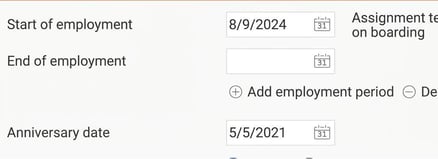
When you add a new employee, their first saved employment date is automatically used as their anniversary date. If you change the employment date later, the anniversary date will not change. You need to change it manually if you want it to match the employment date.
Reminders for birthdays, length of service and anniversaries
You can use the reminder Birthday and time of employment to send a reminder on different occasions, for example ten years after the anniversary date.
The reminder Birthday and time of employment can also be used to send reminders for birthdays and when an employee has reached a certain period of employment.
The difference between length of service and an anniversary date is:
- Anniversary date: The reminder only checks the date specified in the Employee register.
- Length of service: The reminder takes into account whether the person has had several non-consecutive employment periods, and only sends a reminder for the most recent uninterrupted sequence of periods.
Anniversary dates require an HRM Employee licence.
Please note: This article is AI-translated. This means that linguistic errors or misunderstandings may occur.