
Flex frames and early clock out
Flex frames are set with two intervals: one for the schedule's start time and one for the schedule's end time. Flex frames 0–12 and 12–24 mean flex time all day.
Flex frames 0-24 and 0-24 also mean flex time all day.
Example
An employee is scheduled 8–17, with a one-hour break. They start working at 03:30 and clock out at 11:00.
-
Option 1: The flex frames are specified as 0–12 and 12–24.
-
Result: The question about early clock out will be asked.
-
-
Option 2: The flex frames are specified as 0–24.
-
Result: The question about early clock out will not be asked.
-
If clock out happens after 12, the question is not asked in either case.
You can see your flex frames in your time report. Hover the mouse pointer over the graphical time rows to view the frames.
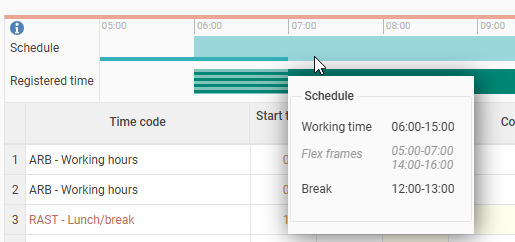
If you get the question about early clock out but do not need to register any absence, select No reason to complete the clock out.
Please note: This article is AI-translated. This means that linguistic errors or misunderstandings may occur.