
Unspecified time means that your time report contains attendance or absence that does not comply with the rules of your day schedule. You need to specify this attendance or absence, for example by registering overtime or absence. HRM Time is often set not to allow auditing of the time report when there is unspecified time, to ensure you register everything correctly before times are transferred to payroll.
Example of unspecified attendance
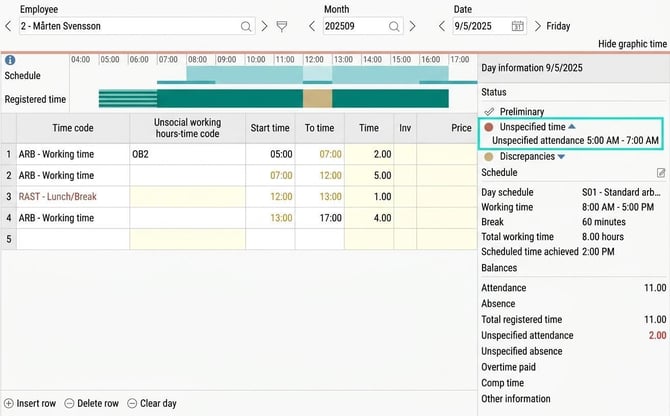
Let's say you are scheduled between 08:00–17:00 and you have the option to work flexible hours from 07:00.
If your time report shows that you have clocked in already at 05:00 but have not marked the time between 05:00–07:00 as overtime, these two hours will appear as unspecified attendance.
If you make an overtime marking and there are overtime rules covering these two hours, the unspecified time will disappear and it will be possible to audit the time report.
Example of unspecified absence
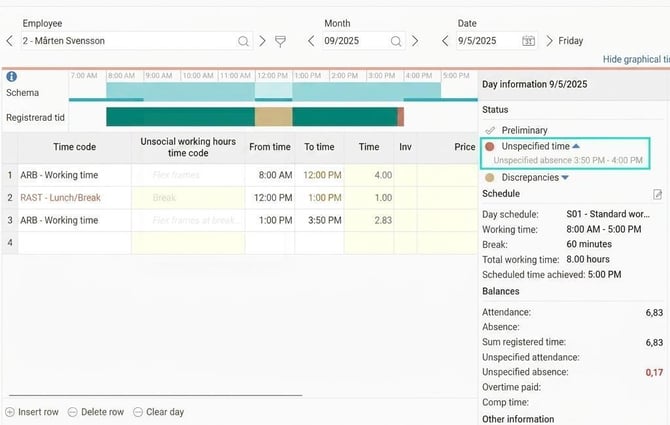
You are scheduled between 08:00–17:00 and have the option to take flexible hours from 16:00.
If you clock out already at 15:50 the time between 15:50–16:00 will become unspecified absence. To comply with the rules of your day schedule, you must specify these ten minutes, for example with an absence time code.
Please note: This article is AI-translated. This means that linguistic errors or misunderstandings may occur.